
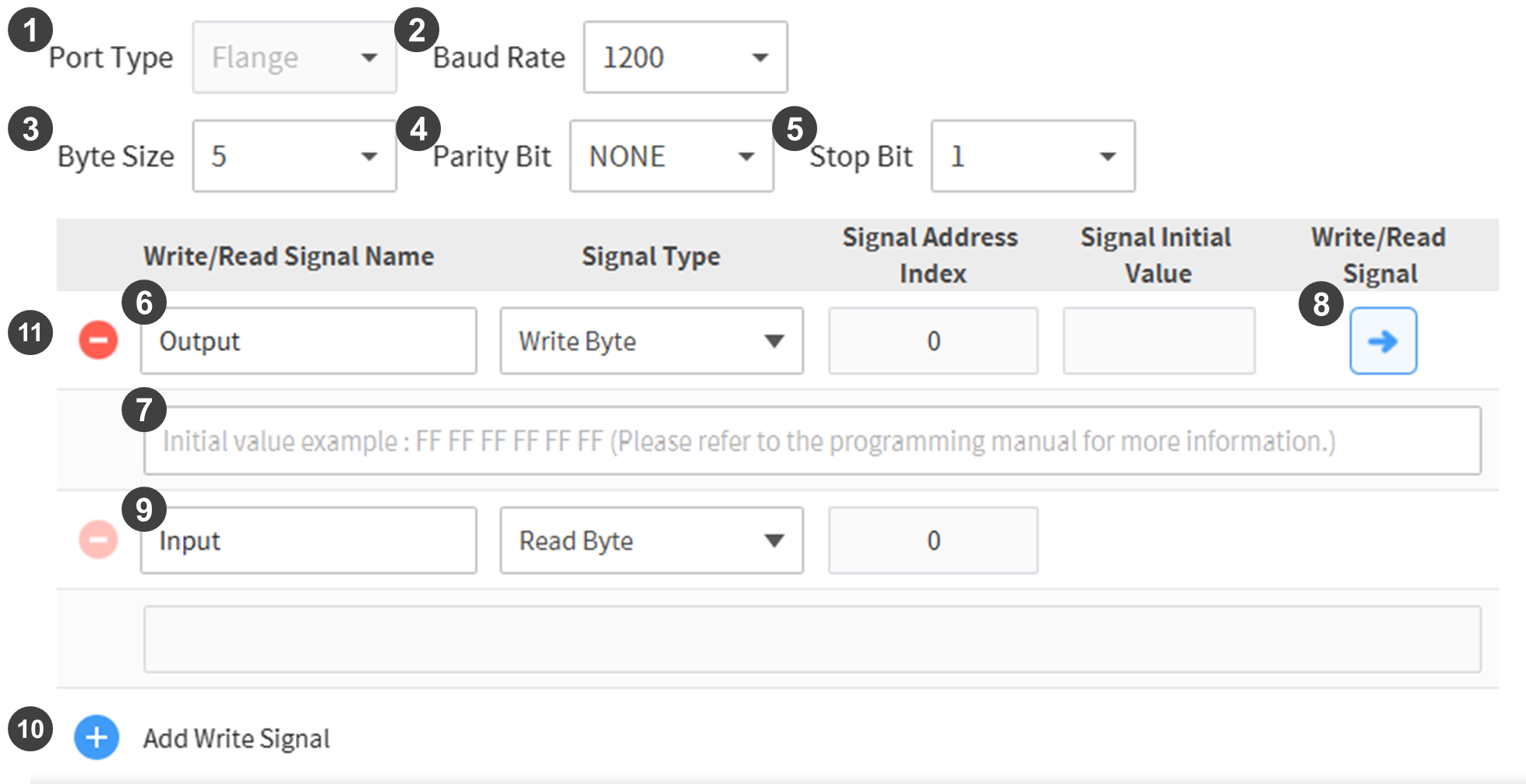
When the communication component of the Workcell Item in the App Builder is created with a flange serial, the corresponding Workcell Item Setting screen appears as follows:
|
No. |
Item |
Description |
|---|---|---|
|
1 |
Port Type |
A different type cannot be set for the flange serial. |
|
2 |
Communication Speed |
Sets the communication speed. |
|
3 |
Byte Size |
Sets the byte size. |
|
4 |
Parity Bit |
Sets the parity bit. |
|
5 |
Stop Bit |
Sets the stop bit. |
|
6 |
Signal Name |
Sets the name of the signal to exchange. |
|
7 |
Output Value |
Sets the flange serial output value.
|
|
8 |
Signal Transmission |
Transmits the entered output value to the connected equipment. |
|
9 |
Input Value |
Displays the input value from the equipment. |
|
10 |
Add Signal |
Adds a signal to output. |
|
11 |
Delete Signal |
Deletes an I/O signal. |