
Function description and usage
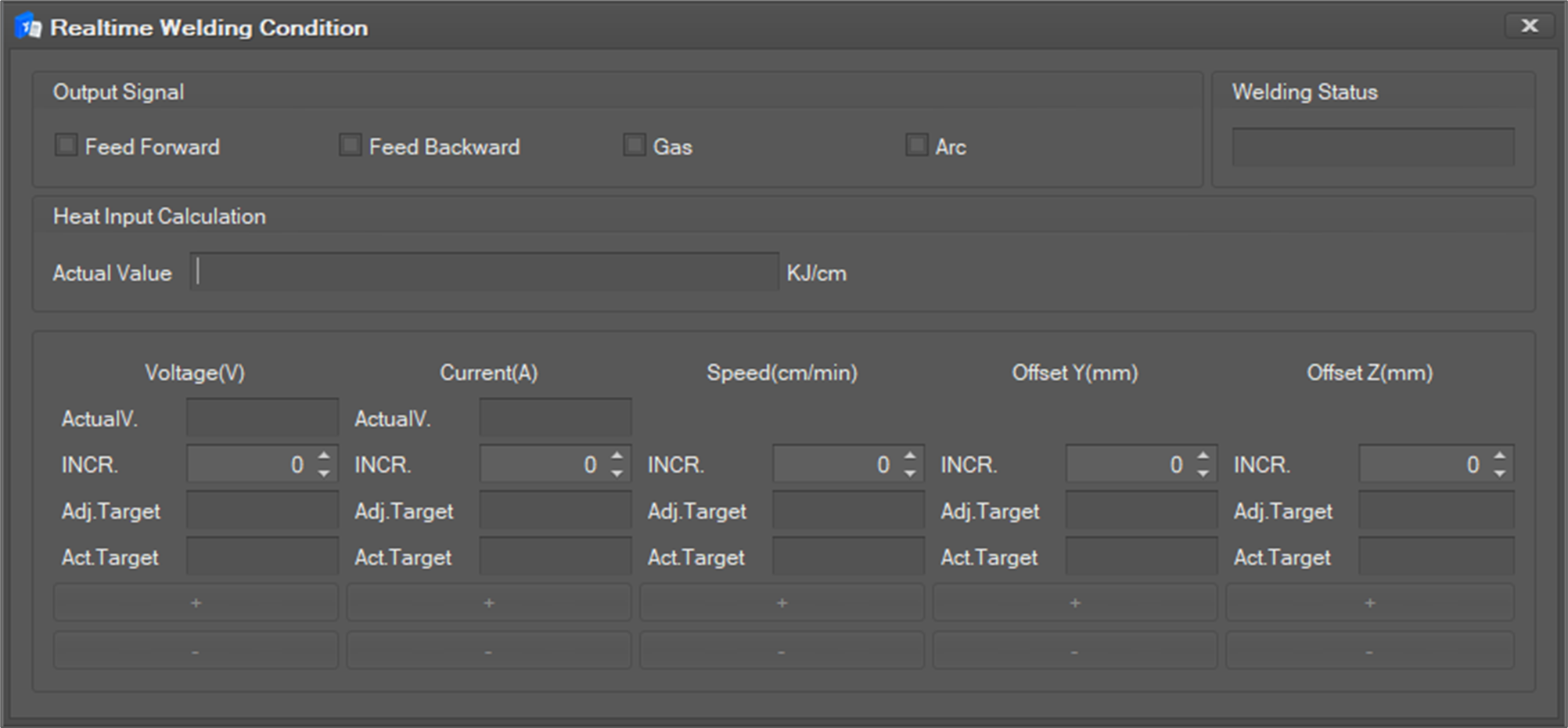
This function is to change or monitor the welding condition value entered in advance when using the welding function.
This function is a paid option function, and the menu for using this function appears on the menu only if you have obtained a corresponding license from the SW provider.
To use this function,
-
Select the Util tab in the main menu and click the Realtime Welding Condition However, the function is a paid option function, and the corresponding menu is displayed only when the license is issued to the SW provider in advance.
-
The Realtime welding condition window as below will open.
-
For the description of each item, refer to the table below.
Item name
Description
Output Signal
Items corresponding to output signals such as Feed Forward/Feed Backward/Gas/Arc are checked
Welding Status
Current welding status is indicated as one of Non-Weld/Weld(Normal)/Weld(Error)/Dry-run
Head Input Calculation
[Actual Value]
60 x Actual Voltage x Actual Current / Adjust Speed / 1,000
Actual Value
Display of measured values of voltage and current
Increment
The increment value for Voltage, Current, Speed, Offset Y, Offset Z
Adjust Target
Adjustment target value of Voltage, Current, Speed, Offset Y, Offset Z
Actual Target
Actual target value of Voltage, Current, Speed, Offset Y, Offset Z
+
Adjustment target value plus increment value
-
Adjustment target value subtract increment value
Controller version
This function cannot be used with a lower controller version than GFx20600
This function cannot be used with a lower controller version than GFx20600.