
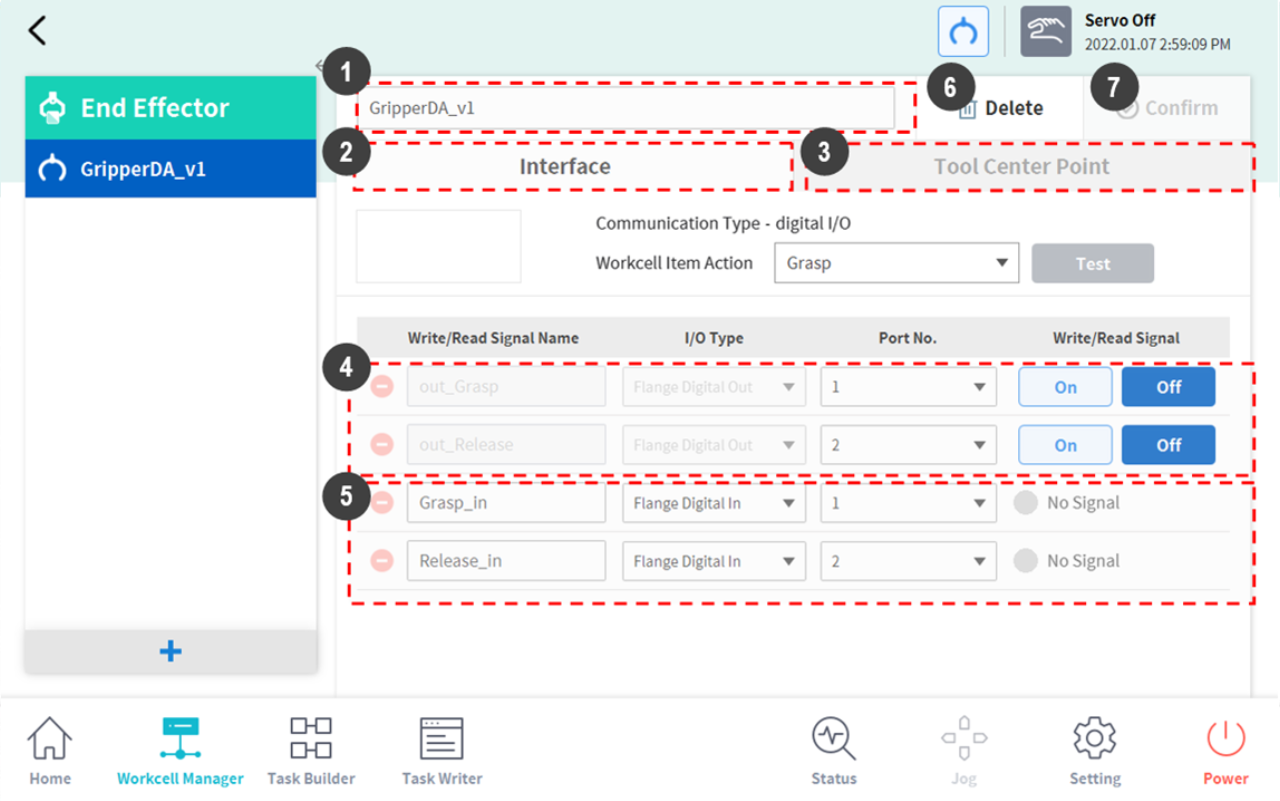
Grippers are end effectors that have fingers to pick up or drop objects. The following is the setting screen for a pneumatic gripper. This example will be used as the basis for explaining how to configure an end effector. For more information about each gripper setting, refer to the separate manuals provided.
|
No. |
Item |
Description |
|
1 |
Workcell Name Input Field |
Enter the name of the end effector. |
|
2 |
Communication |
Sets the I/O signal of the end effector. |
|
3 |
Tool Center Point |
Sets the tool center point (TCP) of the end effector. |
|
4 |
Output Signal |
Checks and sets the output signal. (If a function is enabled in Workcell Item Action, its name and signal type are disabled.)
|
|
5 |
Input Signal |
Checks and sets the input signal. (If a function is enabled in Workcell Item Action, its name and signal type are disabled.)
|
|
6 |
Delete |
Deletes the end effector being configured. |
|
7 |
Confirm |
Saves the setting. |