
The real mode screen end effector information tab of Task Builder is structured as follows:
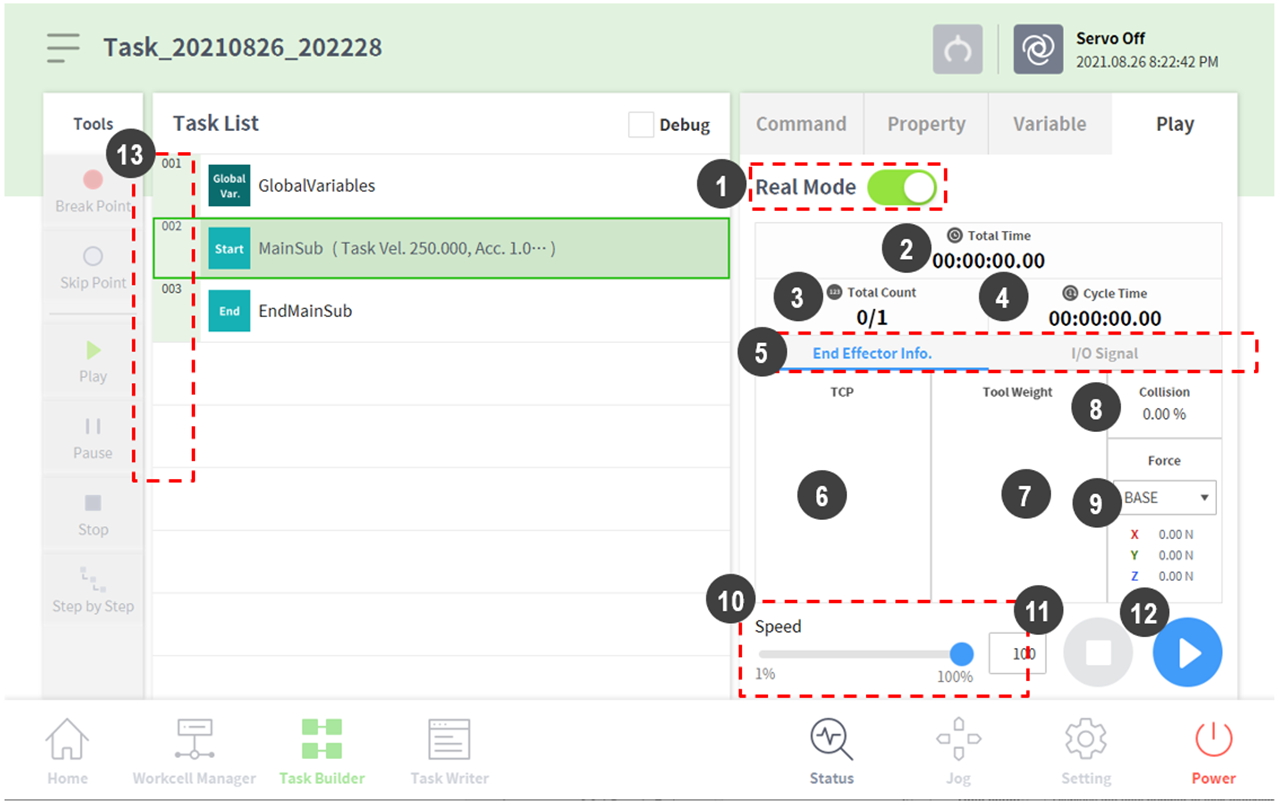
|
No. |
Item |
Description |
|
1 |
Real Mode ( |
Sets the robot test play mode.
|
|
2 |
Total time |
Displays the total time elapsed after the task execution. |
|
3 |
Total count |
Displays the total number of task executions. |
|
4 |
Average execution time |
Displays the average time spent to execute one cycle of the task in the task list. |
|
5 |
Information Screen Shift Tab |
You can switch between the robot information message screen, end-effector information screen, and input/output information screen.
|
|
6 |
Tool center point information area |
Displays the tool center point information configured through the tool center point and weight configuration functions of the set TCP command or the jog. |
|
7 |
Tool weight information |
Displays the tool weight information configured through the tool center point and weight configuration functions of the set TCP command or the jog. |
|
8 |
Collision information area |
Displays the collision sensitivity value set for the area where the robot is currently positioned. |
|
9 |
Force information area |
It displays the force information occurring in the Base, World, User, and Reference coordinate systems. The Reference coordinate system displays force based on the coordinate system information applied to the robot. |
|
10 |
Speed slider |
It sets the speed of the robot in a real or a virtual mode. |
|
11 |
Stop button |
It stops the current task. |
|
12 |
Execute/pause toggle button |
It executes or pauses the work in the task list. |
|
13 |
Time |
It displays the time spent on the corresponding command/skill. |
