
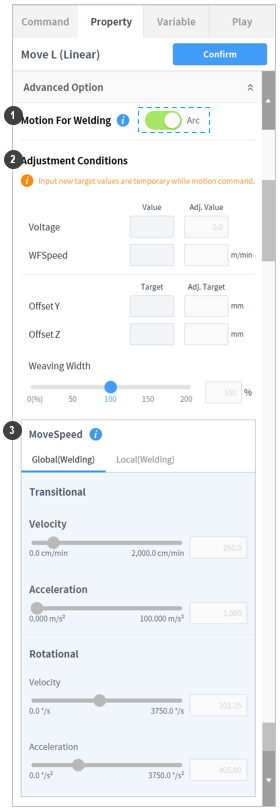
Teaching for a welding task is identical to the standard teaching. MoveL, MoveC, MoveB and MoveSX motion commands can be linked with welding functions. If a motion command is added to a welding block, the Arc-On toggle button will be displayed on the bottom of the Advanced Option menu. When Arc-On is enabled, welding is performed during motion, but when disabled, the welding motion is performed without being linked to the welding function.
Once a welding motion is selected, its welding conditions can be changed. However, a single welding block can only save information for one valid welding/weaving/torch, so if a change is made to a section of a specific motion, real-time condition changes from the popup menu cannot be made during that motion.
|
No. |
Item |
Description |
|
|---|---|---|---|
|
1 |
Select Welding Motion (Motion for Welding) |
Select whether to use the corresponding command as a welding motion. |
|
|
2 |
Condition Adjustment (Adjust Condition) |
Change Welding Condition |
Change the values of the selected welding condition. |
|
Change Weaving Condition |
Change the values of the selected weaving condition. |
||
|
3 |
Movement Speed Adjustment (MoveSpeed) |
In order to change the welding speed, select the Local tab and enter a new speed. The unit used is cm/min. The acceleration and rotation speed/acceleration settings can be changed on both the Global and Local tabs. |
|