
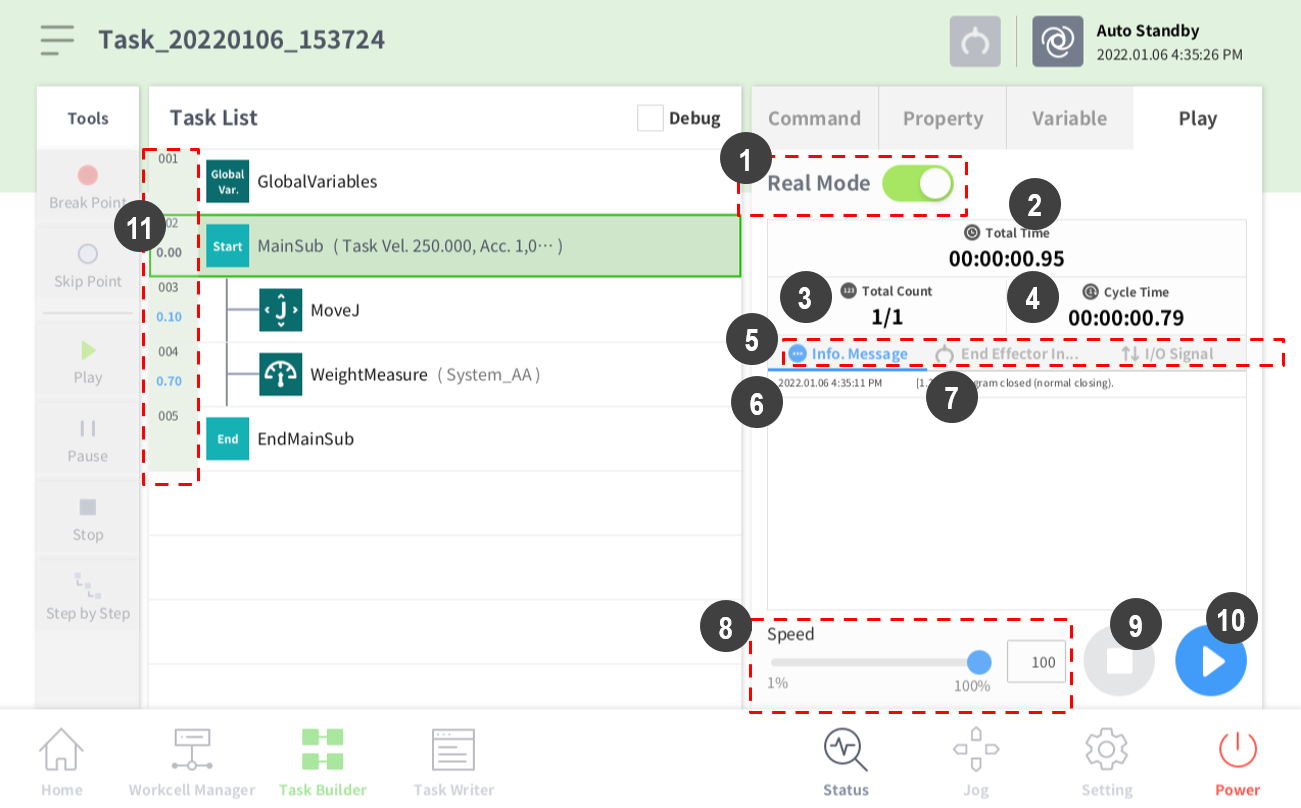
The real mode screen end effector information tab of Task Builder is structured as the following.
|
Item |
Description |
|
|---|---|---|
|
1 |
Real Mode |
It sets the robot test play mode.
|
|
2 |
Total time |
It displays the total time elapsed after the task execution. |
|
3 |
Total count |
It displays the total number of task executions. |
|
4 |
Average execution time |
It displays the average time spent to execute one cycle of the task in the task list. |
|
5 |
Information Screen Shift Tab |
It shifts between the robot information message screen, End Effector information screen and I/O information screen.
|
|
6 |
Information Message Time Area |
It displays the time information of the displayed information message. |
|
7 |
Information Message Area |
Displays the information message. |
|
8 |
Speed slider |
It sets the speed of the robot in a real or a virtual mode. |
|
9 |
Stop button |
It stops the current task. |
|
10 |
Play/Pause Toggle Button |
It executes or pauses the work in the task list. |
|
11 |
Time |
It displays the time spent on the corresponding command/skill. |