
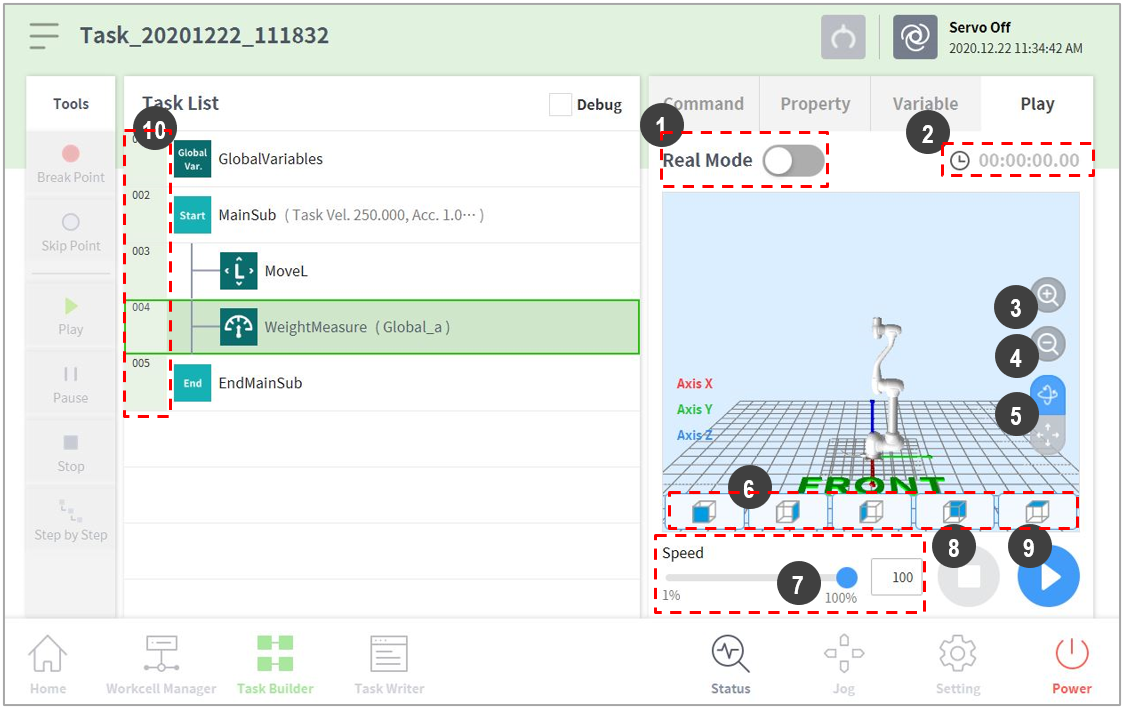
The virtual mode screen of Task Builder is structured as follows:
|
No. |
Item |
Description |
|
1 |
Real mode ( |
Sets the robot test play mode.
|
|
2 |
Total time |
Displays the total time elapsed after the task execution. |
|
3 |
Simulator Zoom-in button |
Zooms into the simulated robot model. |
|
4 |
Simulator Zoom-out button |
Zooms out from the simulated robot model. |
|
5 |
Rotate and pan button |
Rotate button Pan button |
|
6 |
Viewpoint button |
Sets viewpoints with the robot model as the control point. |
|
7 |
Speed slider |
It sets the speed of the robot in a real or a virtual mode. |
|
8 |
Stop button |
It stops the current task. |
|
9 |
Execute/pause toggle button |
It executes or pauses the work in the task list. |
|
10 |
Time |
It displays the time spent on the corresponding command/skill. |


