
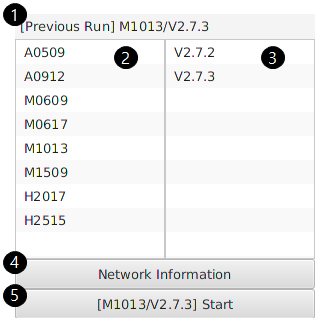
After completing the setting, if you run the DART Simulator image, the following screen is displayed.
|
No. |
Items |
Description |
|---|---|---|
|
1 |
Recent run information |
Outputs the robot model and version that recently ran DART-Simulator. |
|
2 |
Select robot model |
Select the robot model to run DART-Simulator on. |
|
3 |
Select version |
Select the version to run DART-Simulator on.
|
|
4 |
Check network information |
You can check the network information of DART-Simulator. |
|
5 |
Run DART-Simulator |
Run DART-Simulator with the selected robot model and version.
|