2.12 2.10.3 Korean English Chinese Czech Dutch French German Hungarian Italian Japanese Polish Portuguese Spanish

Set Break Point

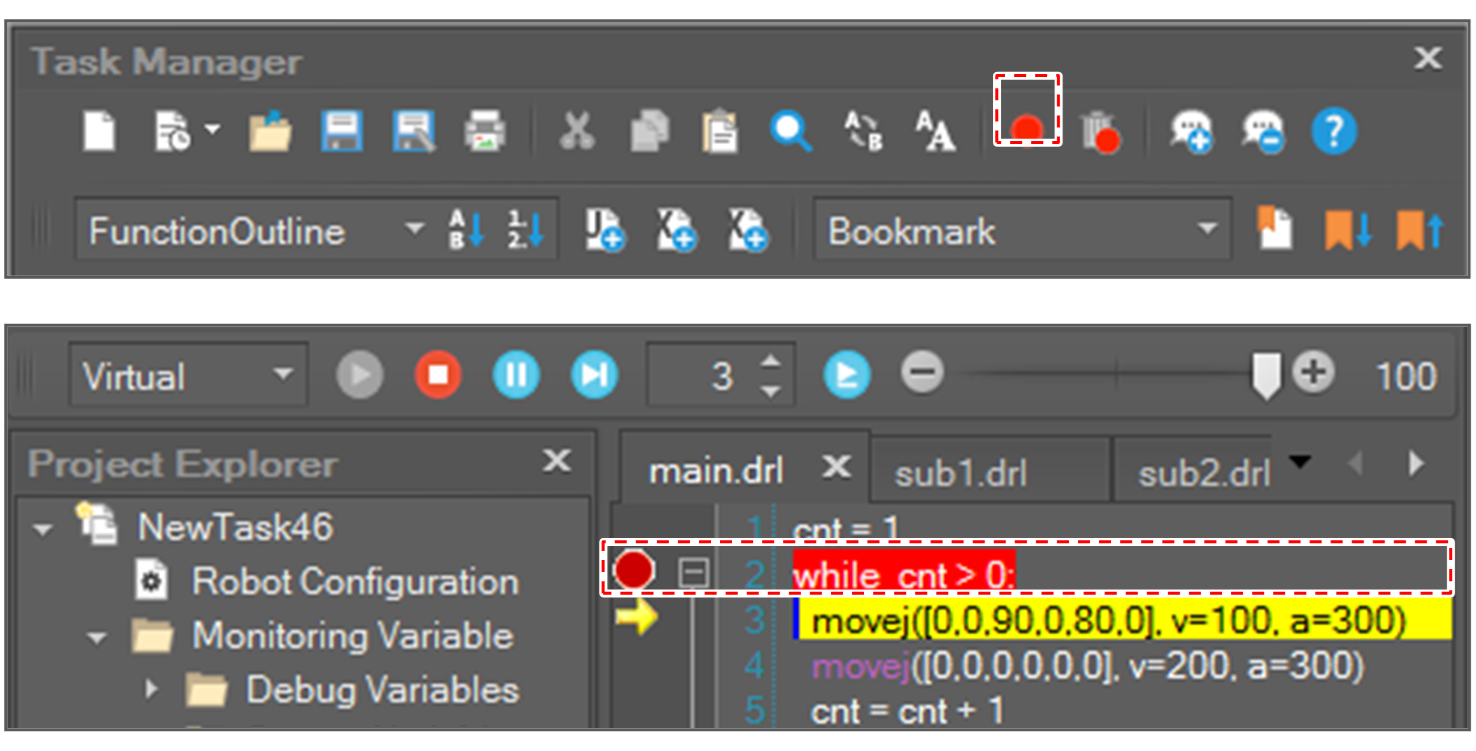
If a break point is set to a program line, the program running is paused when the running cursor reaches the line.

Add Break Point

When the cursor is at a line with no break point, if you click the Toggle Break Point image2021-11-29_14-24-29.png  button or press the F9 key, a break point is added to the line.

image2021-11-30_11-10-46.png

When there is no break point in that marker line, if you click the marker area, a break point is added to the line.

Remove Break Point

When the cursor is at the line with a break point, click the Toggle Break Point image2021-11-29_14-24-29.png  button or press the F9 key to remove the break point from the line.

  • The break point can be also removed by clicking a break point in the marker area.

  • To remove all break points at once, click the Remove All Break Points image2021-11-29_14-26-34.png button or press the Ctrl + Shift + F9

https://manual.doosanrobotics.com/download/attachments/13669388/image2021-11-30_11-12-54.png?version=1&modificationDate=1638238377526&api=v2