Breadcrumbs

Monitoring During Execution (Play)

If the arc sensing function is configured in WCI, the arc sensing monitoring feature will be activated on the welding monitoring screen.
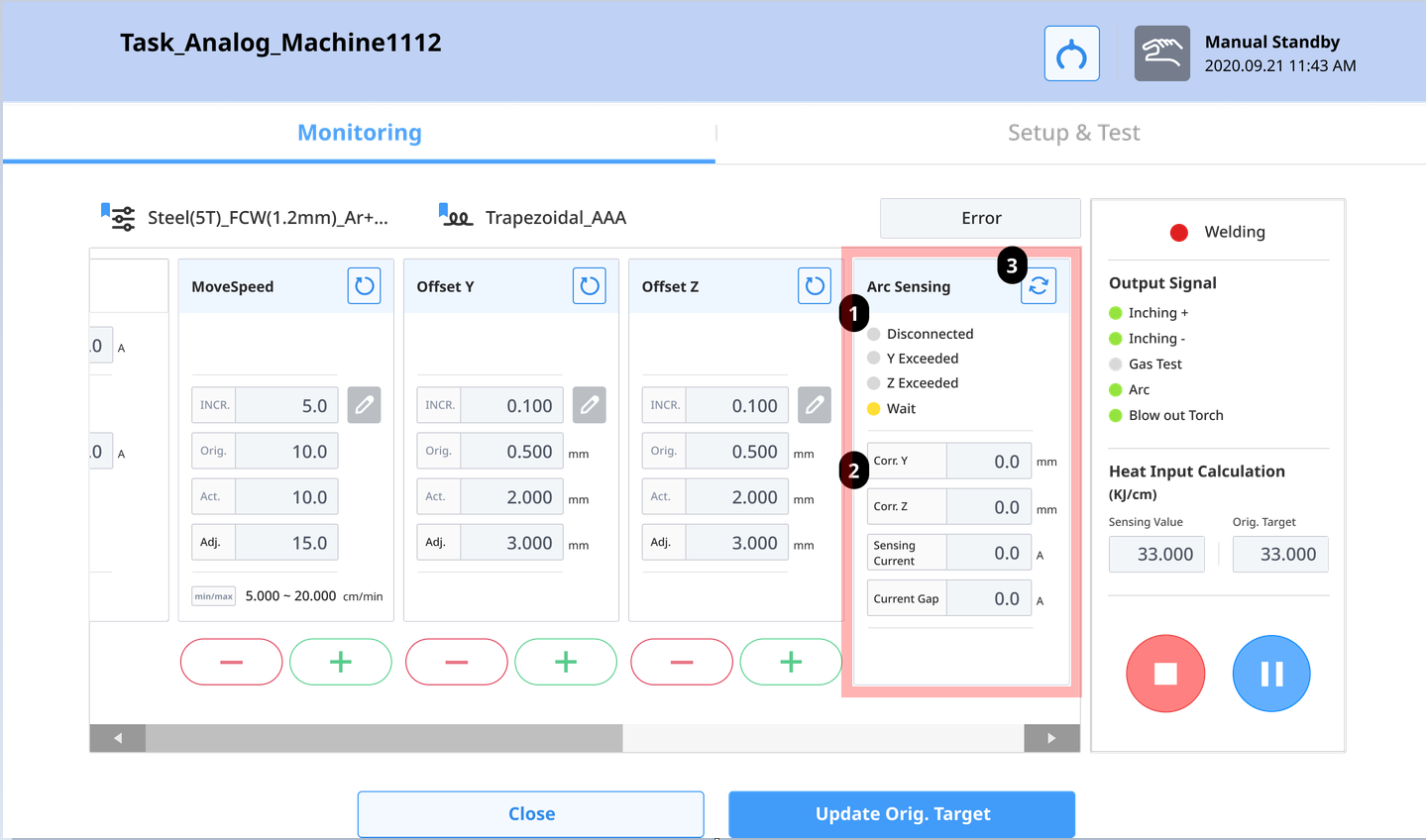
image-20241219-075118.png

Number

Item

Description

1

DAQ device connection status & monitoring status display

DAQ connection status : Connected / Disconnected
Y correction amount exceeds maximum : green light if exceeded Z correction amount exceeds maximum : green light if exceeded
Arc Sensing Operating Status

  • Before program execution : Stop status

  • After program execution : Goes through Wait and Ready status to become ready

  • When weaving motion starts : Arc sensing starts in On Progress

  • If DAQ disconnection or sensor value error occurs : Error status

Note. In the event of an Error status, the arc sensing algorithm terminates, and welding continues with the last correction value.

2

Arc sensing-related numerical monitoring

Corr. Y : Monitors Y correction amount in mm units.
Corr. Z : Monitors Z correction amount in mm units.
Sensing Current : Monitors welding current data in A units.
Current Gap : Monitors the difference between welding target current and current measured value in A units.

3

Refresh button

Refreshes the DAQ connection status.