
In Workcell Manager → Peripheral, click the + button
Create an Arc Sensing item in the Workcell Manager - Peripheral menu.
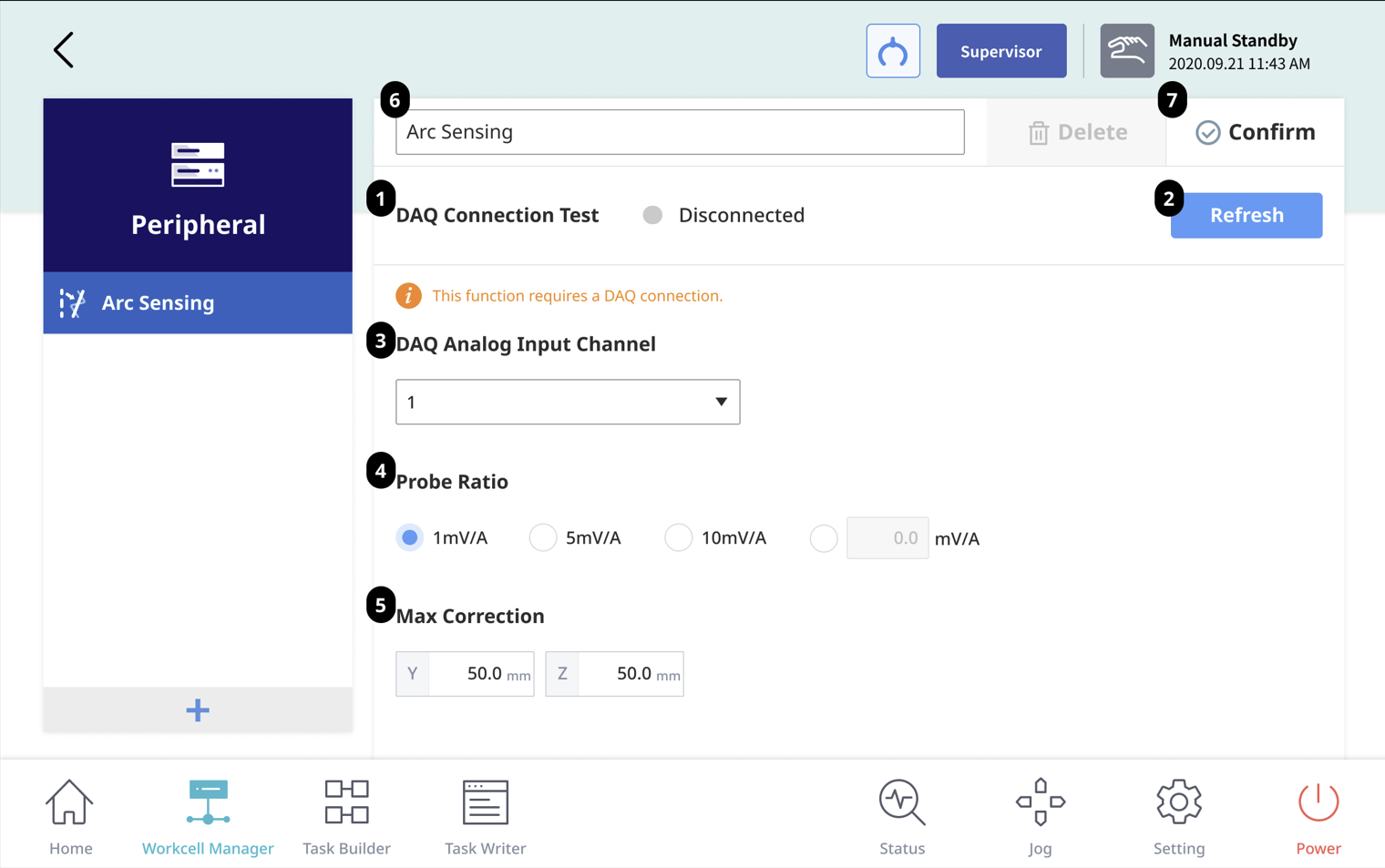
|
Number |
Item |
Description |
|---|---|---|
|
1 |
DAQ Connection Test |
Displays the DAQ connection status. |
|
2 |
Refresh button |
Use to refresh the DAQ connection status. |
|
3 |
DAQ Analog Input Channel |
Sets the channel to which the current sensor is connected on DAQ. (Range: 0 ~ 15) |
|
4 |
Probe Ratio |
Sets the current-to-voltage conversion ratio. (Unit: mV/A) |
|
5 |
Max Correction |
Sets the maximum correction amount the arc sensing algorithm will correct. (Unit: mm, default value: 50mm, range: 0 ~ 100mm) |
|
6 |
Enter WCI Name |
Sets the WCI name. |
|
7 |
Save WCI |
Finishes WCI configuration and saves it. |