Breadcrumbs

Vision Tool Teaching Area Setting

image2021-11-26_10-53-29.png

image2021-11-26_10-53-41.png

image2021-11-26_10-53-51.png


No.

Item

Description

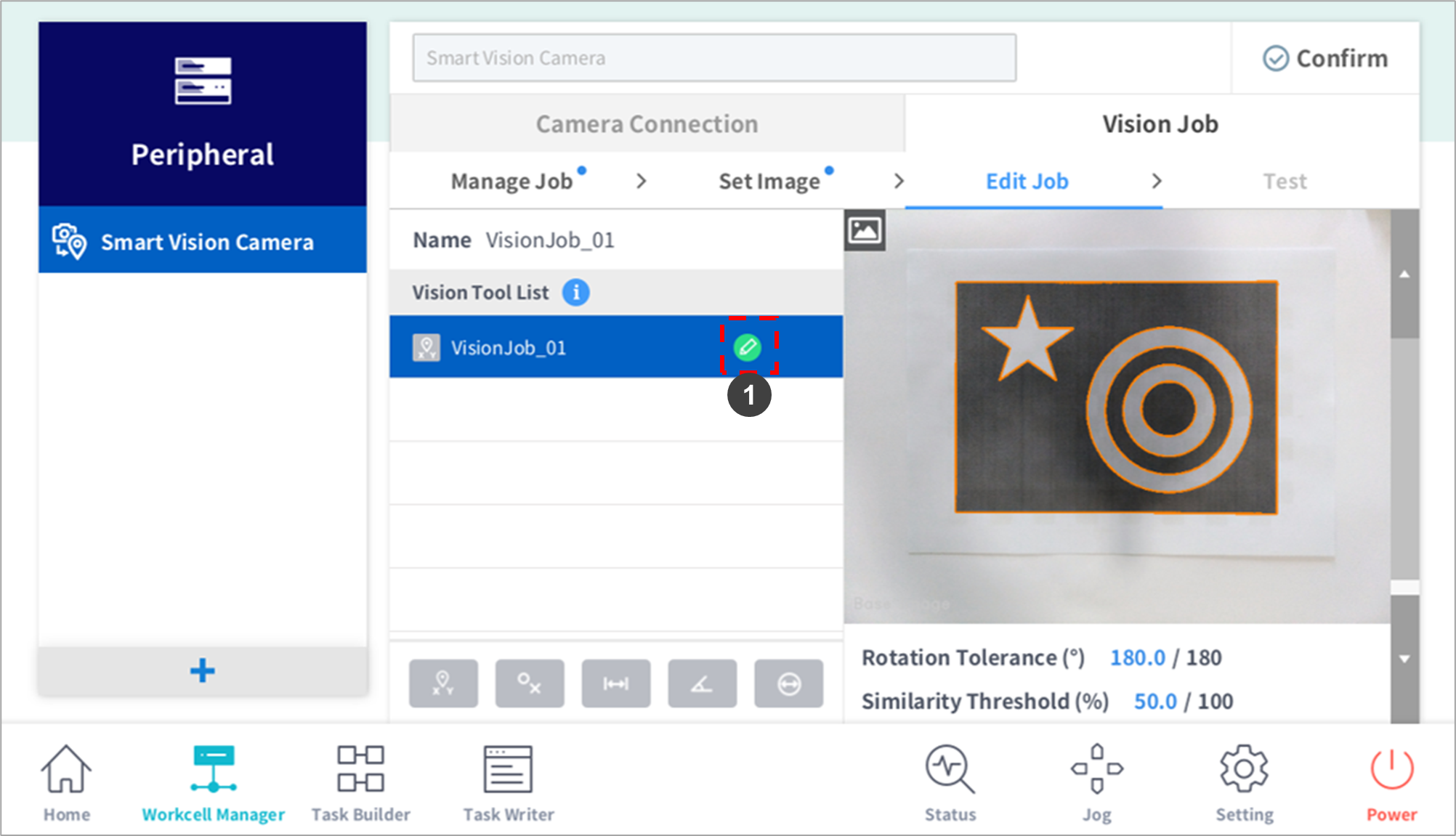
1

Edit

The settings popup window for the job selected from the Vision Tool List is displayed.

2

Move Teaching Area (green area)

Press and hold the arrow to move the teaching area.

  • Press the Apply button to set the selected area.

3

Adjust Teaching Area Size (green area)

Press and hold the arrow to adjust the teaching area size.

  • Press the Apply button to set the selected area.

4

Edit Job Name

A virtual keyboard is displayed, and the job name can be edited.

  • Press the Apply button to apply the name to the camera.

5

Crop Inspection Area

A window limiting the teaching area is displayed. The set area is...

  • Saved to the camera when the Apply button is pressed.

6

Rotation Tolerance

Configures the angle tolerance from the reference angle. (input range: 0~180°)

  • Sets the acceptance range for items rotated at an angle deviating from the Reference Image.

  • For example, if the Rotation Tolerance is 180 (-180~+180), it detects items in all rotation angle ranges, and if the Angle Tolerance is 10 (-10~+10), it only detects items rotated within 10˚ from the Reference Image. Setting a larger Angle Tolerance value increases detection speed, and a smaller value decreases detection speed.

  • The tolerance is immediately applied when the scroll is moved.

7

Similarity Threshold

Configures the similarity threshold from the reference value. (0~100%)

  • Similarity is the level of matching between the edge of the item image and the edge in the Reference Image.

  • The similarity of the item to detect can be set by adjusting the Similarity Threshold.

  • For example, if the Similarity Threshold is 50, the system only detects items matching a Reference Image of 50% or more.

  • Higher Similarity Threshold values increase the level of distinguishing similar items, but fail to measure items if there are items with small changes, camera distortions or light reflection changes.

  • Lower Similarity Threshold values allow flexibility in responding to item/environment changes, but this can cause incorrect measurements of similar items within the measurement area.

  • Setting a proper Similarity Threshold to match the measuring item/environment is crucial to the success of the Vision Job.

  • The tolerance is immediately applied when the scroll is moved.

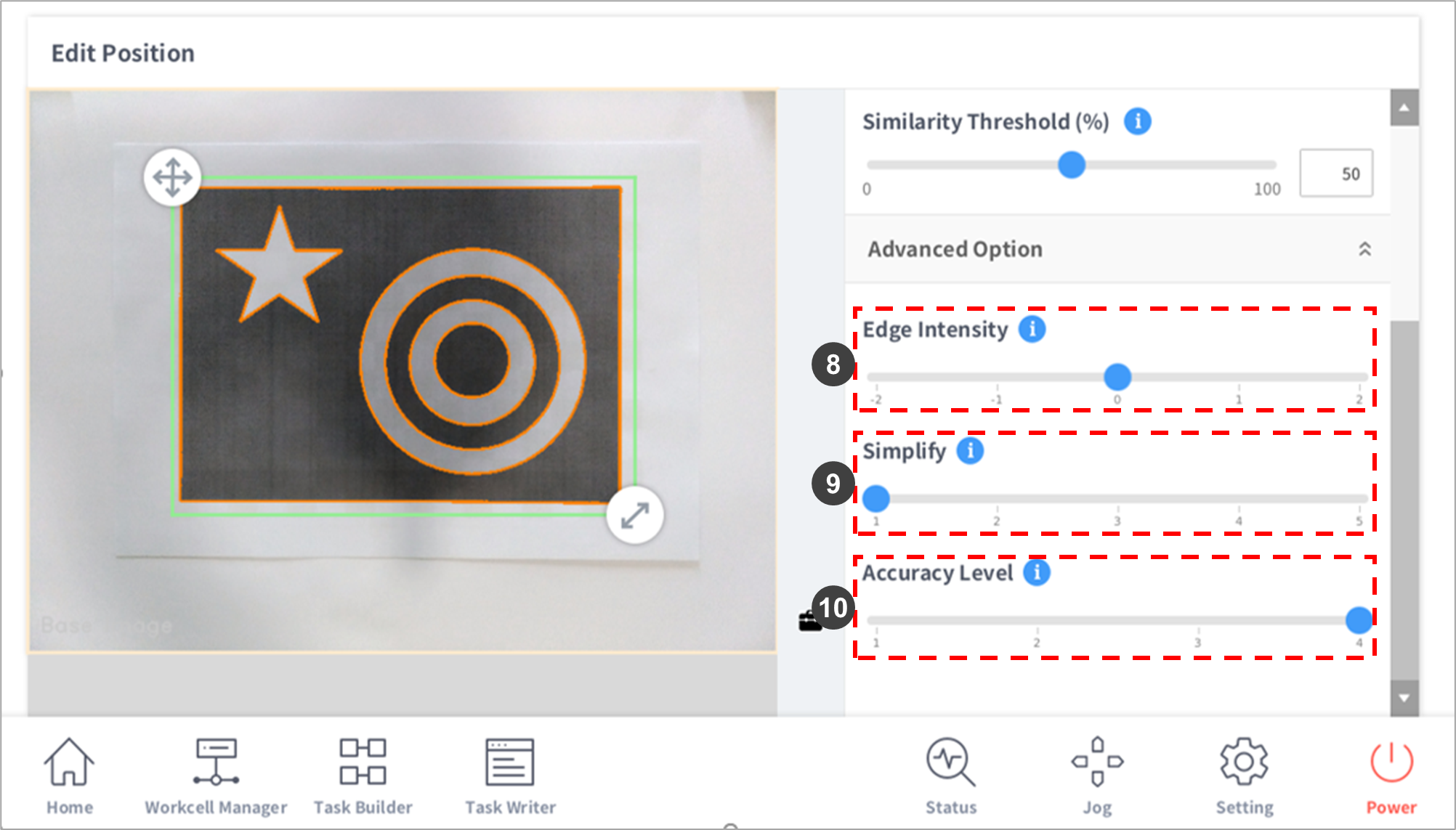
8

Edge Intensity

Sets the intensity of edges detected.

  • Larger color differences in the area surrounding the edge result in higher edge intensity, and smaller color differences result in lower edge intensity.

  • If the intensity is set as [+2] from the default [0], only edges with high intensity appear, and edges with low intensity are removed. Setting [-2] will display edges with both high and low intensities.

  • The tolerance is immediately applied when the scroll is moved.

9

Simplify

Clean up edges by simplifying them.

  • Small, noise-like edges among measured edges disturb the teaching of shapes. Changing the value from 1 to 5 will remove small edges.

  • Larger values remove smaller edges and improve calculation speed.

  • The tolerance is immediately applied when the scroll is moved.

10

Accuracy Level

Adjust the Accuracy Level if you want to detect items more accurately or faster.

  • Larger values improve shape detection accuracy.

  • Smaller values improve detection speed, but decrease shape detection accuracy.

  • The tolerance is immediately applied when the scroll is moved.

11

Apply

Applies Vision Job settings.

12

Cancel

Cancels Vision Job settings.