
The debug mode of the Task Writer screen is structured as follows:
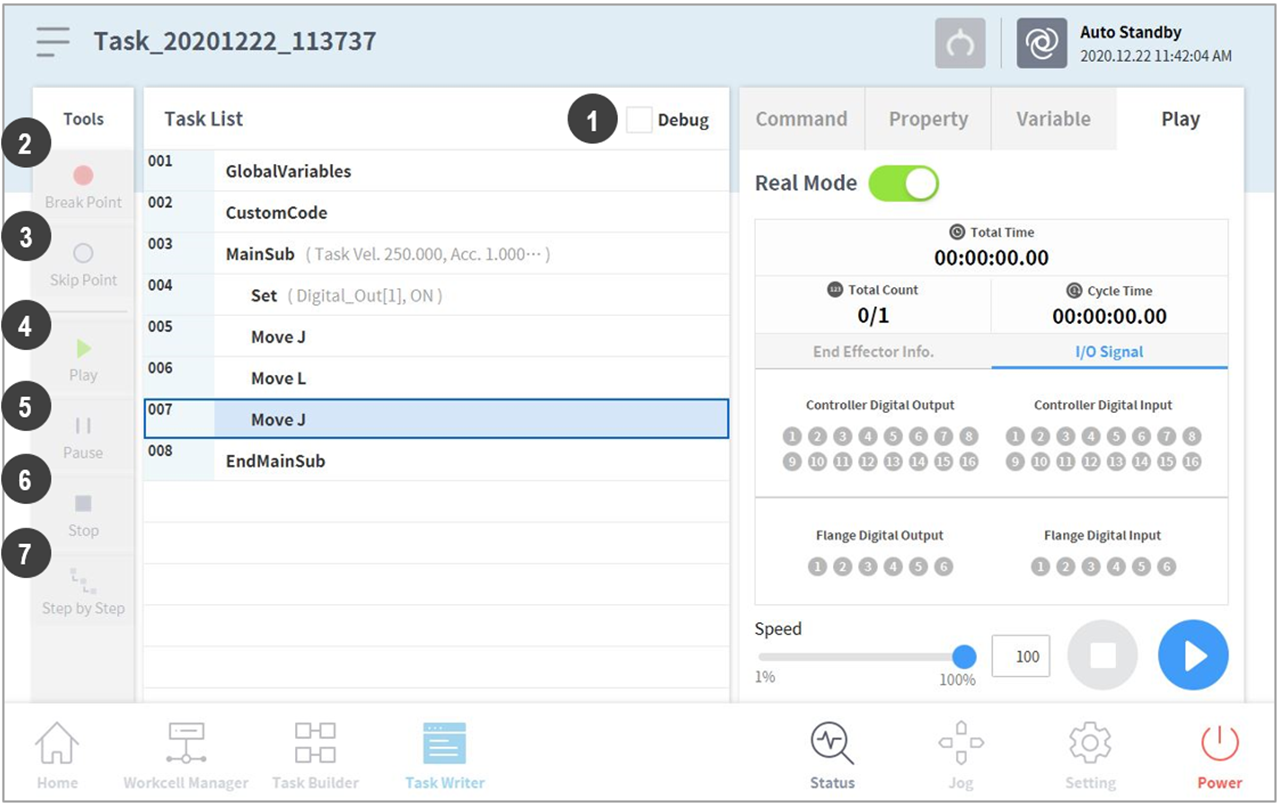
|
No. |
Item |
Description |
|
1 |
Debug |
Sets the robot test play debug mode. |
|
2 |
Break Point Button |
Sets a break point in a command. When the command is reached after executing the task, the robot does not execute the task and stops. |
|
3 |
Skip Point Button |
Sets a skip point in a command. When the command is reached after executing the task, the robot does not execute the task. |
|
4 |
Play/Restart Toggle Button |
Executes the task in debug mode. If the break point is reached during task execution or if the task is paused, the button changes to the Restart button. |
|
5 |
Pause Button |
Temporarily pauses the current task execution. |
|
6 |
Stop button |
Suspends the current task. |
|
7 |
Stage by Stage |
Executes one command at a time while the task is paused. |