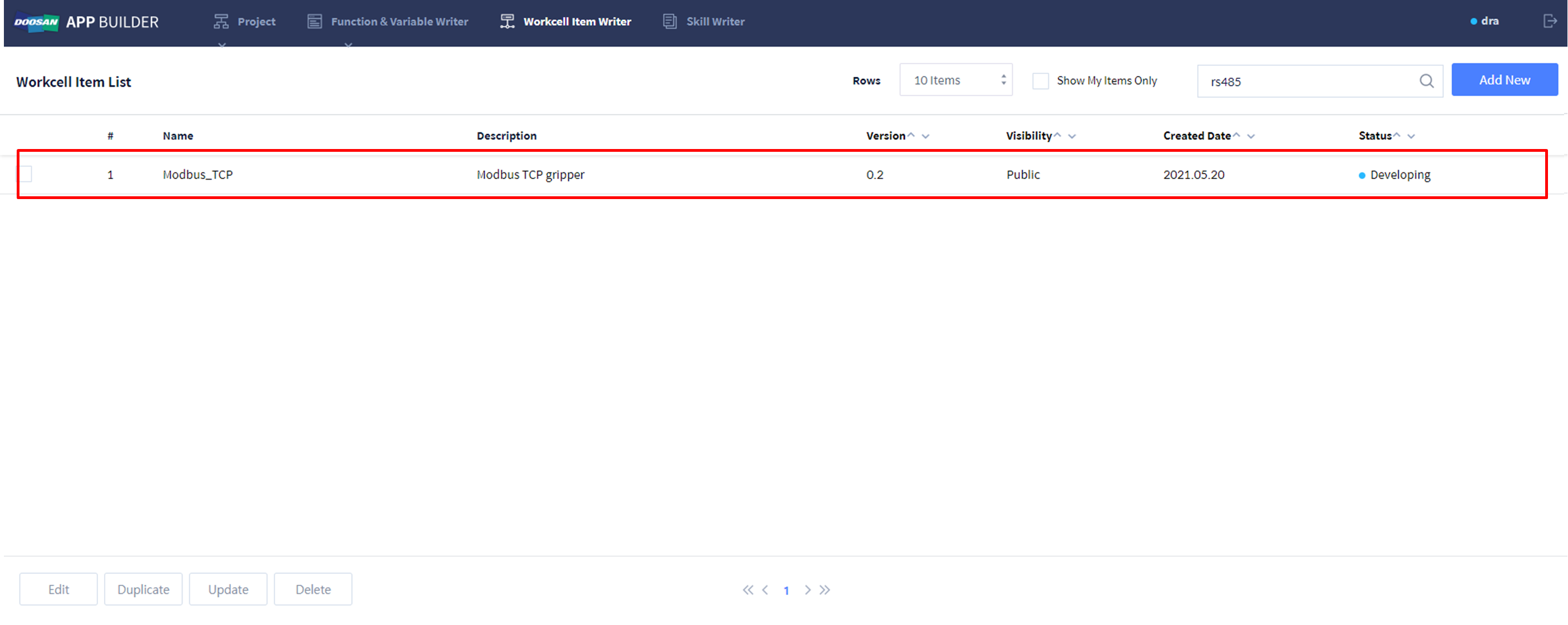
Workcell Item Writer를 이용하여 WCI를 생성할 수 있습니다.
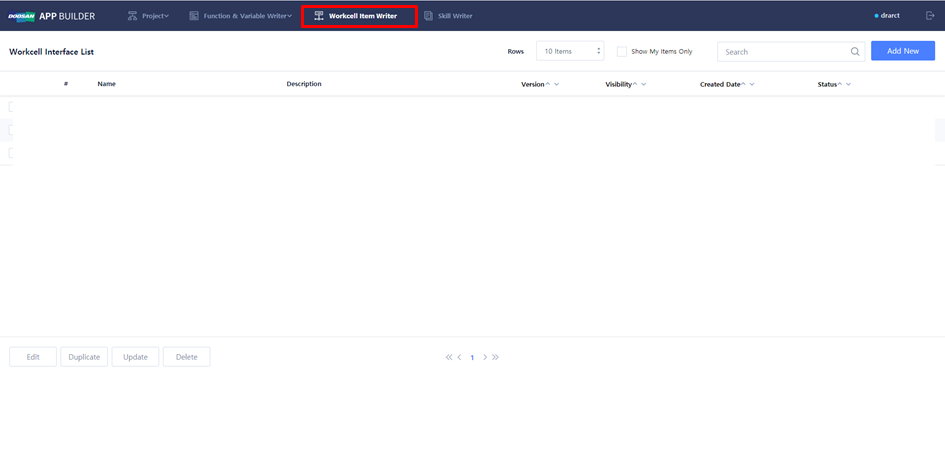
-
WCI를 새로 생성하거나, 기존 WCI를 수정할 수 있습니다.
-
새로운 WCI 생성: Add New
-
기존 WCI 수정: 기존 WCI 중 하나 체크 → Edit
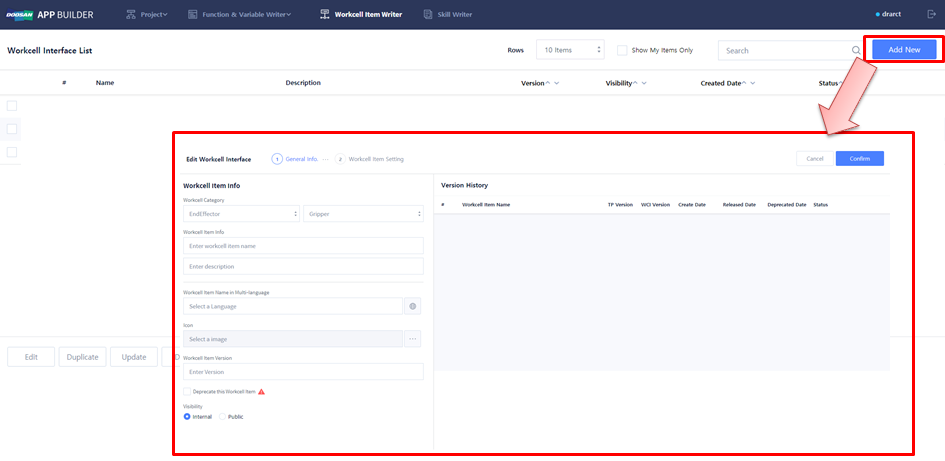
WCI 작성 및 수정 (General Info)
-
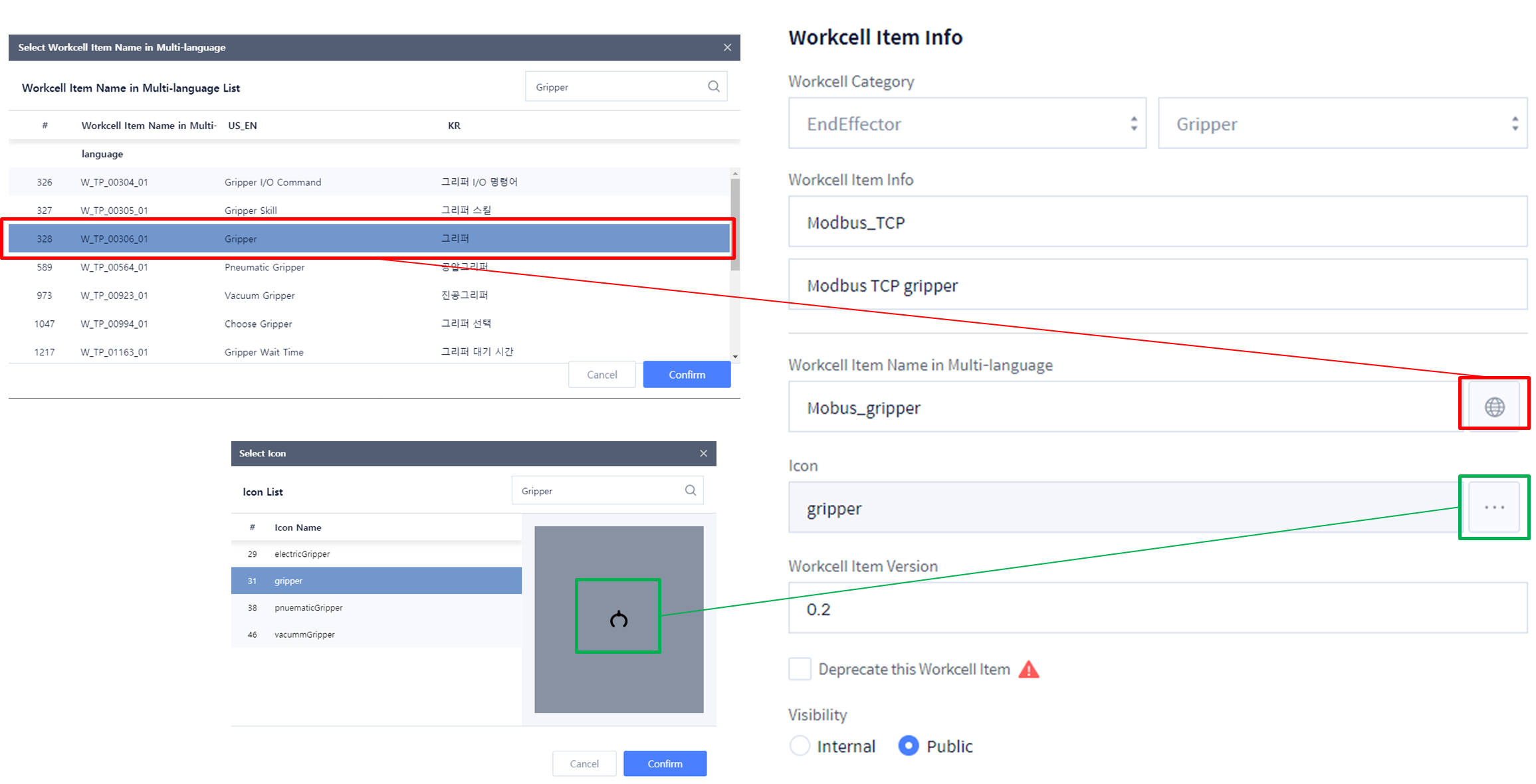
WCI Category를 선택합니다.EndEffector → Gripper
-
WCI Info에 WCI Name과 Description을 입력합니다.Modbus_TCPModbus TCP gripper
-
Multi-language 입력 란에 WCI의 이름이나 Language Code 를 입력합니다(이곳에 기록한 이름이 티치 펜던트에 나타납니다).Choose: (none)Enter: Modbus_gripper
-
WCI의 icon 을 선택합니다.gripper
-
WCI의 버전을 입력합니다.0.1
-
Visibility Type을 선택합니다.Internal
WCI 작성 및 수정 (Workcell Item Setting)
-
Workcell I/O Component : 통신 모듈
-
DRL Component: WCI Action 의 기능을 작성하는 Component
-
UI Component: 사용자 입력 연결 기능을 제공하는 Component
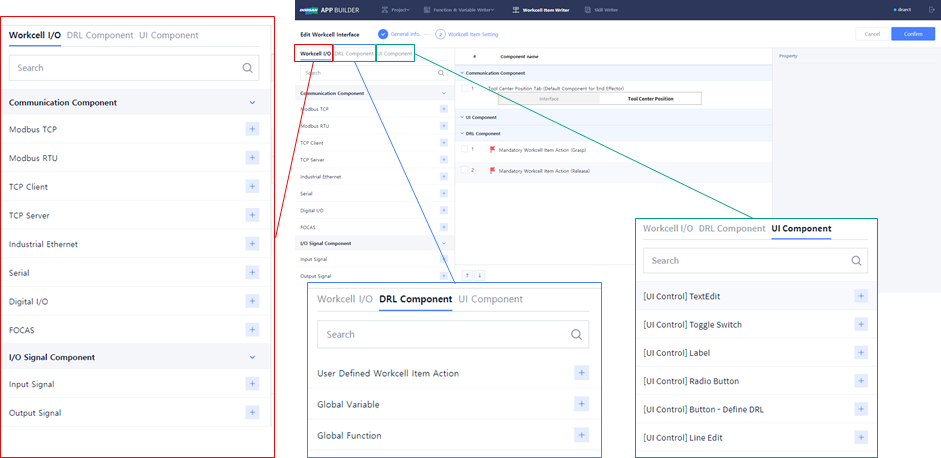
Workcell I/O Component
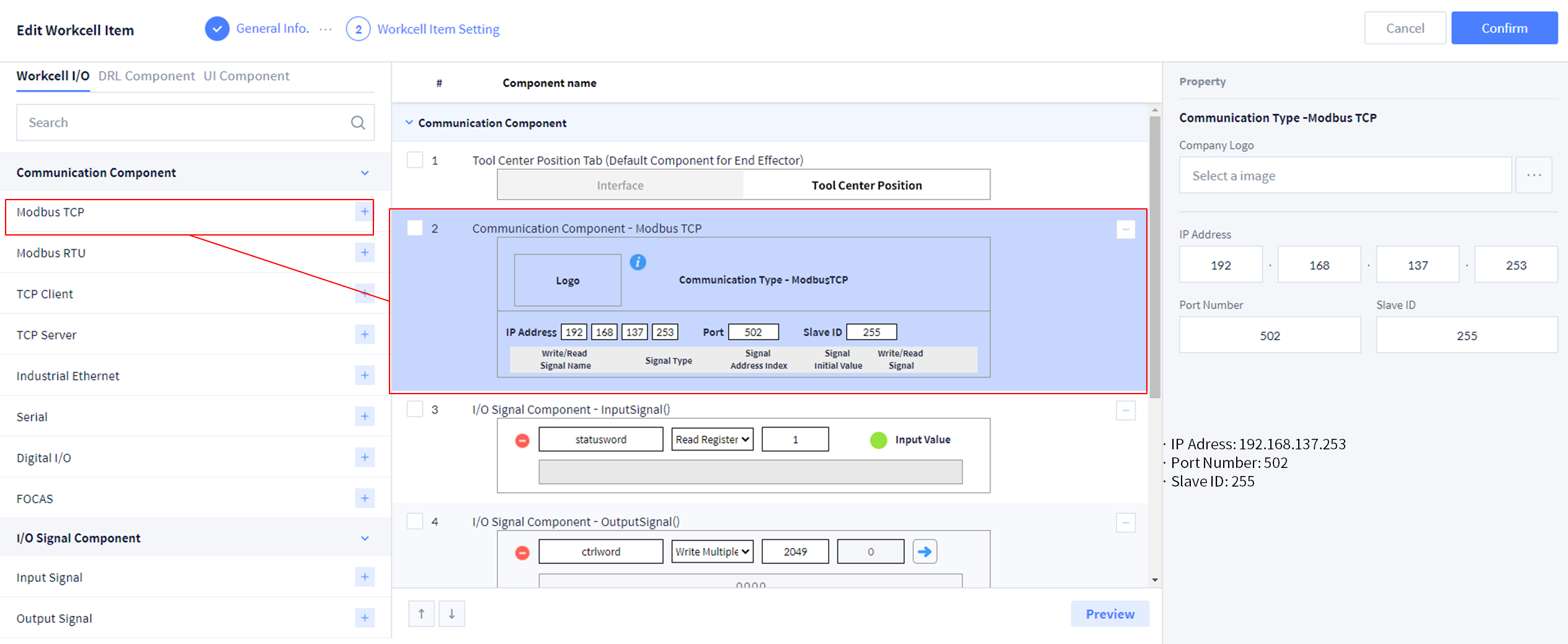
1. Communication Component에서 Modbus TCP를 추가하고 다음과 같이 Property를 입력하십시오.
-
IP Adress : 192.168.137.253
-
Port Number : 502
-
Slave ID : 255
2. Output Signal을 추가하고 다음과 같이 Property를 입력하십시오.
-
Write Signal Name : ctrlword
-
Signal Type : Write Multiple Registers
-
Signal Address Index : 2049
-
Signal Initial Value : 0
-
Custom Data : 0,0,0,0
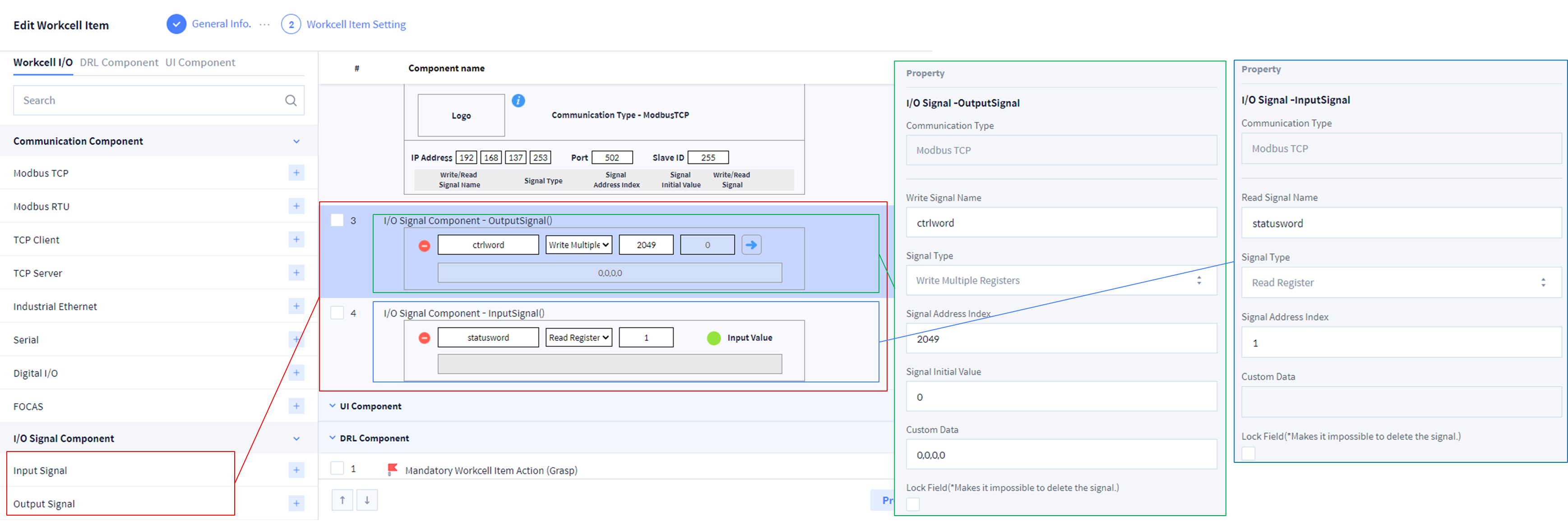
3. Input Signal을 추가하고 다음과 같이 Property를 입력하십시오.
-
Write Signal Name : statusword
-
Signal Type : Red Registers
-
Signal Address Index : 1
DRL Component
1. Mandatory WCI Action: WCI와 관련된 필수 기능을 설정합니다.
-
Gripper → Grasp
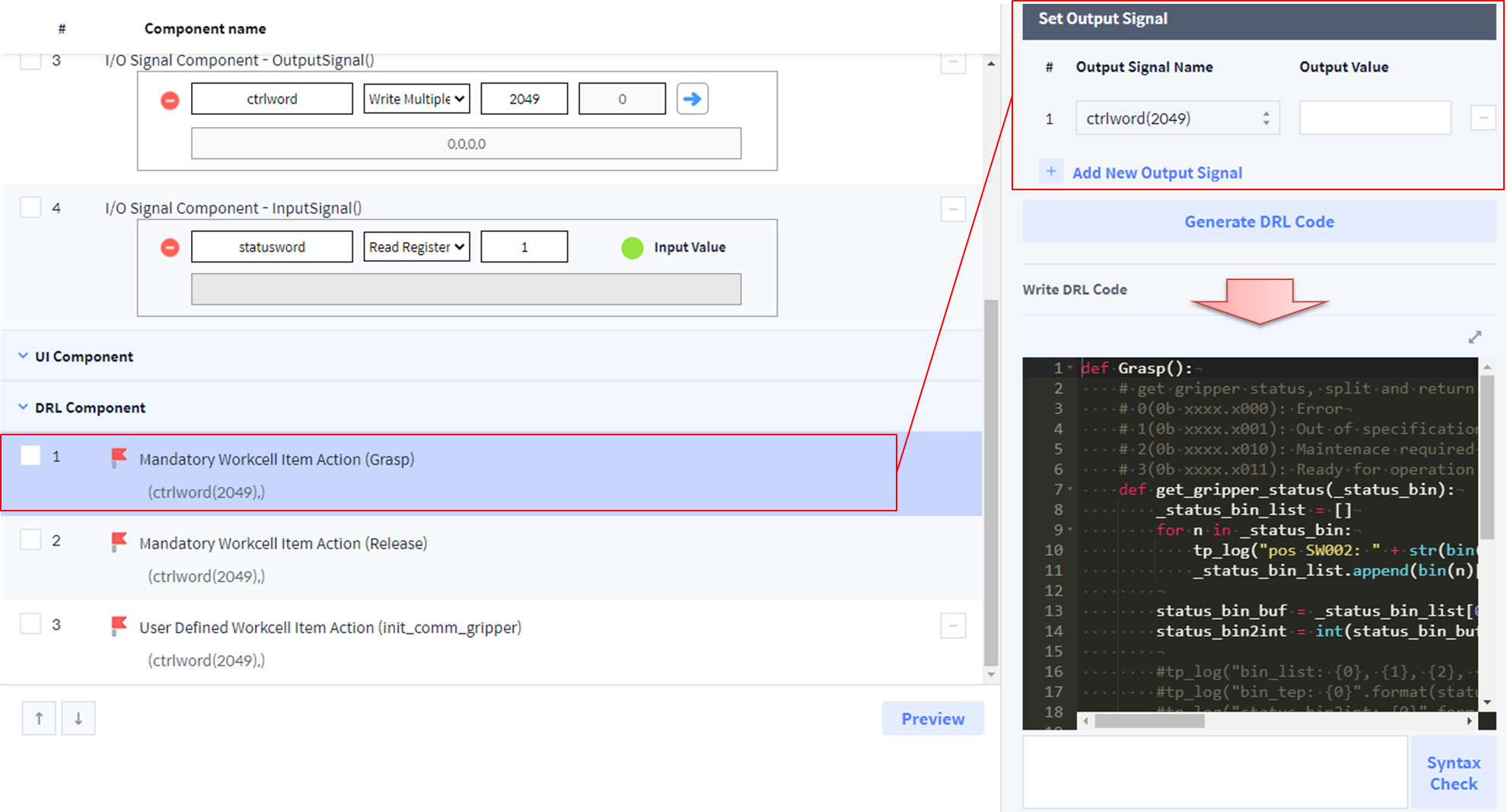
def Grasp():
    # get gripper status, split and return the 2,1,0 bit of first byte of the status word     .
    # 0(0b xxxx.x000): Error
    # 1(0b xxxx.x001): Out of specification
    # 2(0b xxxx.x010): Maintenace required
    # 3(0b xxxx.x011): Ready for operation (= there is no error)
    def get_gripper_status(_status_bin):
        _status_bin_list = []
        for n in _status_bin:
            tp_log("pos SW002: " + str(bin(n)[2:]))
            _status_bin_list.append(bin(n)[2:])

        status_bin_buf = _status_bin_list[0][5:8]
        status_bin2int = int(status_bin_buf, 2)

        return status_bin2int

    set_modbus_output_multi("ctrlword",[int('0000010000000000',2),int('0000001100000000',2),0,0])
    wait(0.1)
    set_modbus_output_multi("ctrlword",[int('1000010000000000',2),int('0000001100000000',2),0,0]) #grasp
    wait(2)
    status = get_modbus_input_multi("statusword")     #StatusWord
    #tp_log("pos SW002: " + str(status))
    now_gripper_status = get_gripper_status(status)
    tp_log("gripper_status: " + str(now_gripper_status))
    while True:
        if now_gripper_status == 3:
            break
        else:
            tp_popup("Error: Wrong gripper status!, (CW, 512)", DR_PM_MESSAGE)
2. Mandatory WCI Action: WCI와 관련된 필수 기능을 설정합니다.
-
Gripper → Release
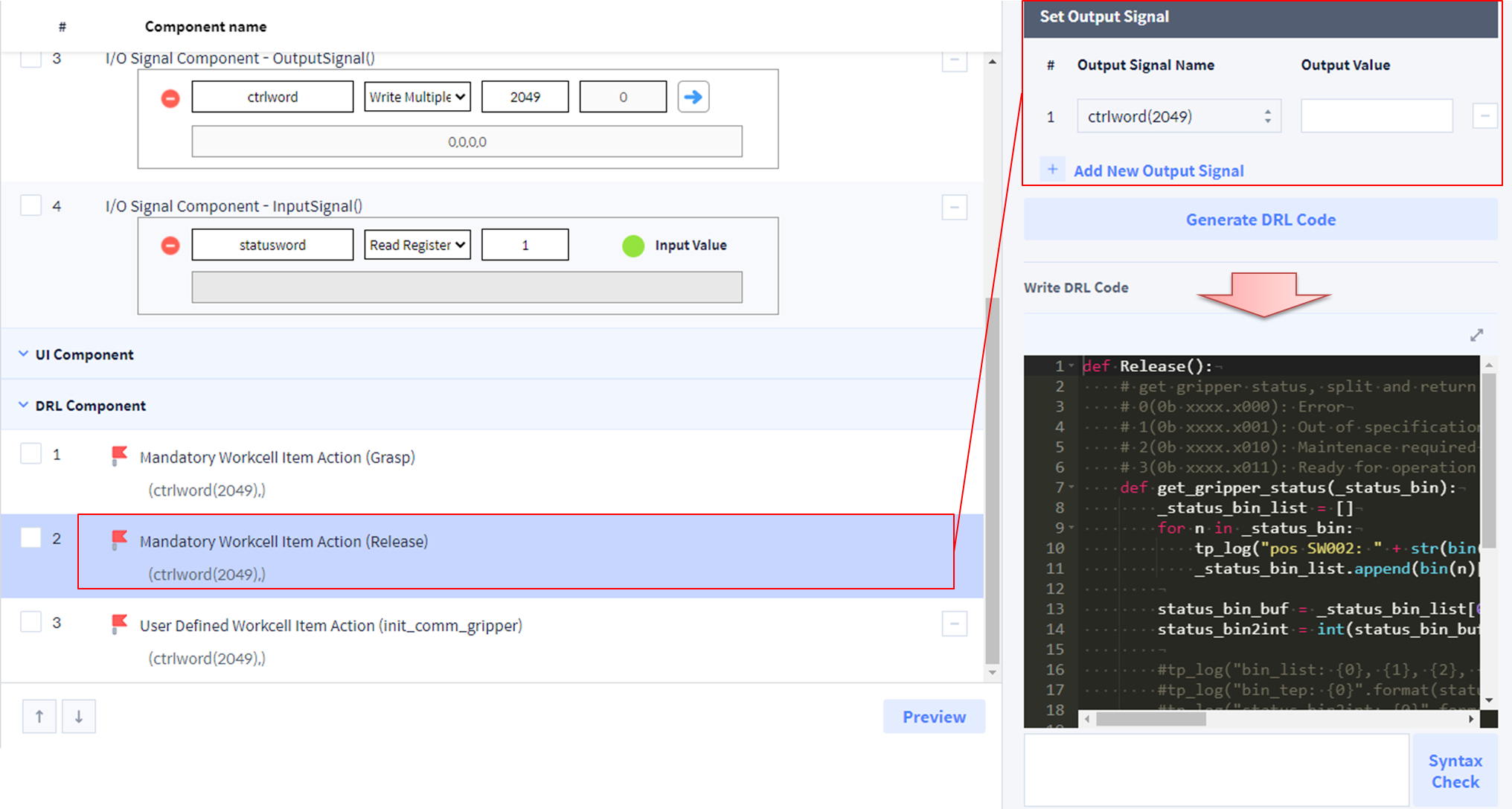
def Release():
    # get gripper status, split and return the 2,1,0 bit of first byte of the status word     .
    # 0(0b xxxx.x000): Error
    # 1(0b xxxx.x001): Out of specification
    # 2(0b xxxx.x010): Maintenace required
    # 3(0b xxxx.x011): Ready for operation (= there is no error)
    def get_gripper_status(_status_bin):
        _status_bin_list = []
        for n in _status_bin:
            tp_log("pos SW002: " + str(bin(n)[2:]))
            _status_bin_list.append(bin(n)[2:])

        status_bin_buf = _status_bin_list[0][5:8]
        status_bin2int = int(status_bin_buf, 2)

        return status_bin2int
	set_modbus_output_multi("ctrlword",[int('0000010000000001',2),int('0000001100000000',2),0,0])
    wait(0.1)
    set_modbus_output_multi("ctrlword",[int('1000010000000001',2),int('0000001100000000',2),0,0])   #release
    wait(2)
    status = get_modbus_input_multi("statusword")     #StatusWord
    now_gripper_status = get_gripper_status(status)
    tp_log("gripper_status: " + str(now_gripper_status))
    while True:
        if now_gripper_status == 3:
            break
        else:
            tp_popup("Error: Wrong gripper status!, (CW, 512)", DR_PM_MESSAGE)
3. User Defined WCI Action: WCI와 관련된 옵션 기능을 추가할 수 있습니다.
-
Init_comm_gripper
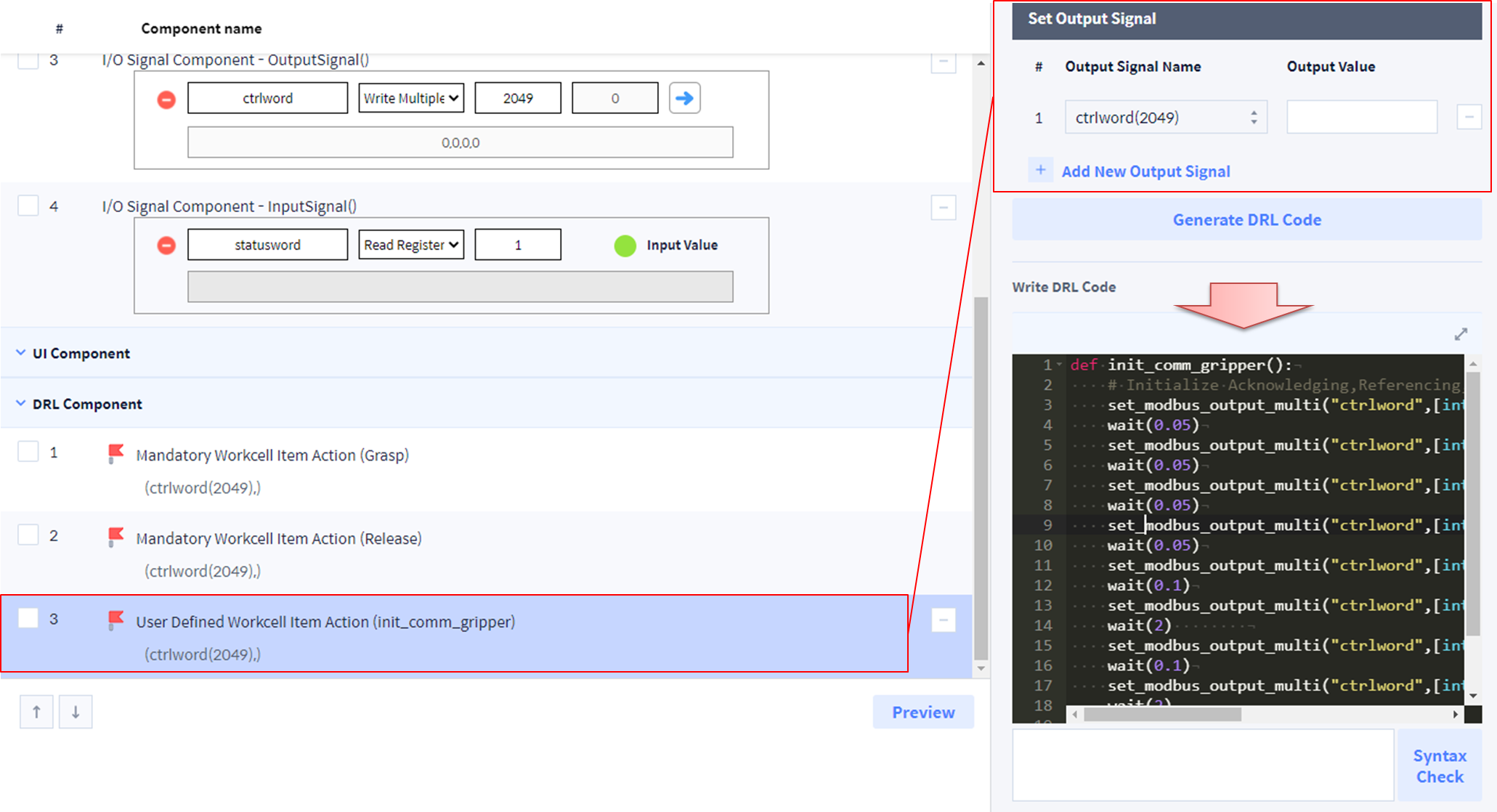
def init_comm_gripper():
    # Initialize Acknowledging,Referencing,Position words
    set_modbus_output_multi("ctrlword",[int('0000000100000000',2),0,0,0]) #00 00 00 01 00 00 00 00
    wait(0.05)
    set_modbus_output_multi("ctrlword",[int('1000000100000000',2),0,0,0]) #10 00 00 01 00 00 00 00
    wait(0.05)
    set_modbus_output_multi("ctrlword",[int('0000001000000000',2),0,0,0]) #00 00 00 10 00 00 00 00
    wait(0.05)
    set_modbus_output_multi("ctrlword",[int('1000001000000000',2),0,0,0]) #10 00 00 10 00 00 00 00
    wait(0.05)
    set_modbus_output_multi("ctrlword",[int('0000010000000000',2),int('0000000000000000',2),0,0])
    wait(0.1)
    set_modbus_output_multi("ctrlword",[int('1000010000000000',2),int('0000000000000000',2),0,0])
    wait(2)
    set_modbus_output_multi("ctrlword",[int('0000010000000001',2),int('0000000000000000',2),0,0])
    wait(0.1)
    set_modbus_output_multi("ctrlword",[int('1000010000000001',2),int('0000000000000000',2),0,0])
    wait(2)

    status = get_modbus_input_multi("statusword")     #StatusWord
    tp_log("log SW: " + str(status))
UI Component
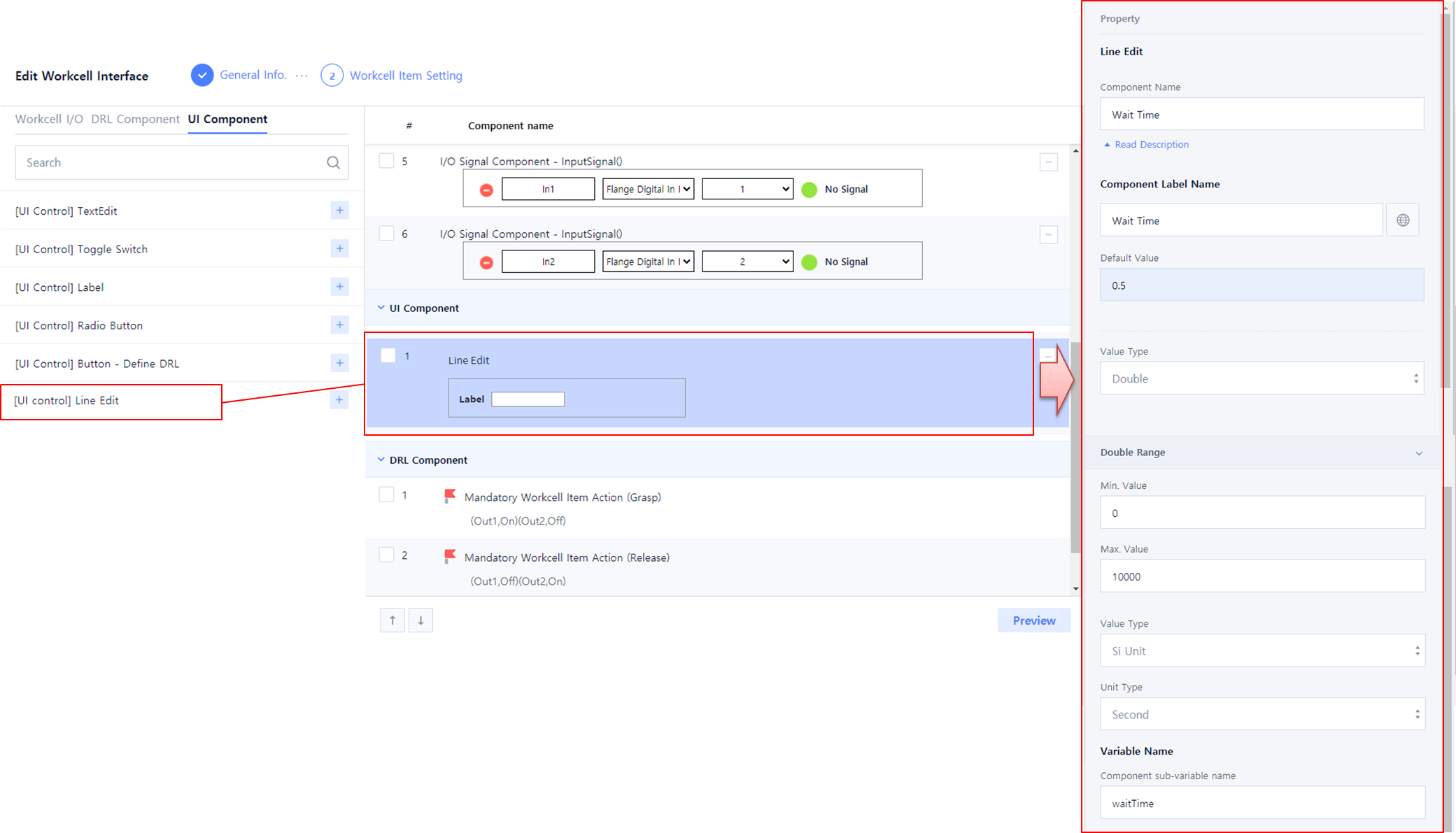
UI Component에서 Line Edit을 추가하고 다음과 같이 Property를 입력하십시오.
-
Component Name : Wait Time
-
Component Label Name : Wait Time
-
Default Value : 0.5
-
Value Type : Double
-
Double Range
-
Min Value : 0
-
Max Value : 10000
-
Value Type: SI Unit
-
Unit Type: Second
-
-
Variable Name
-
Component sub-variable name : waitTime
-
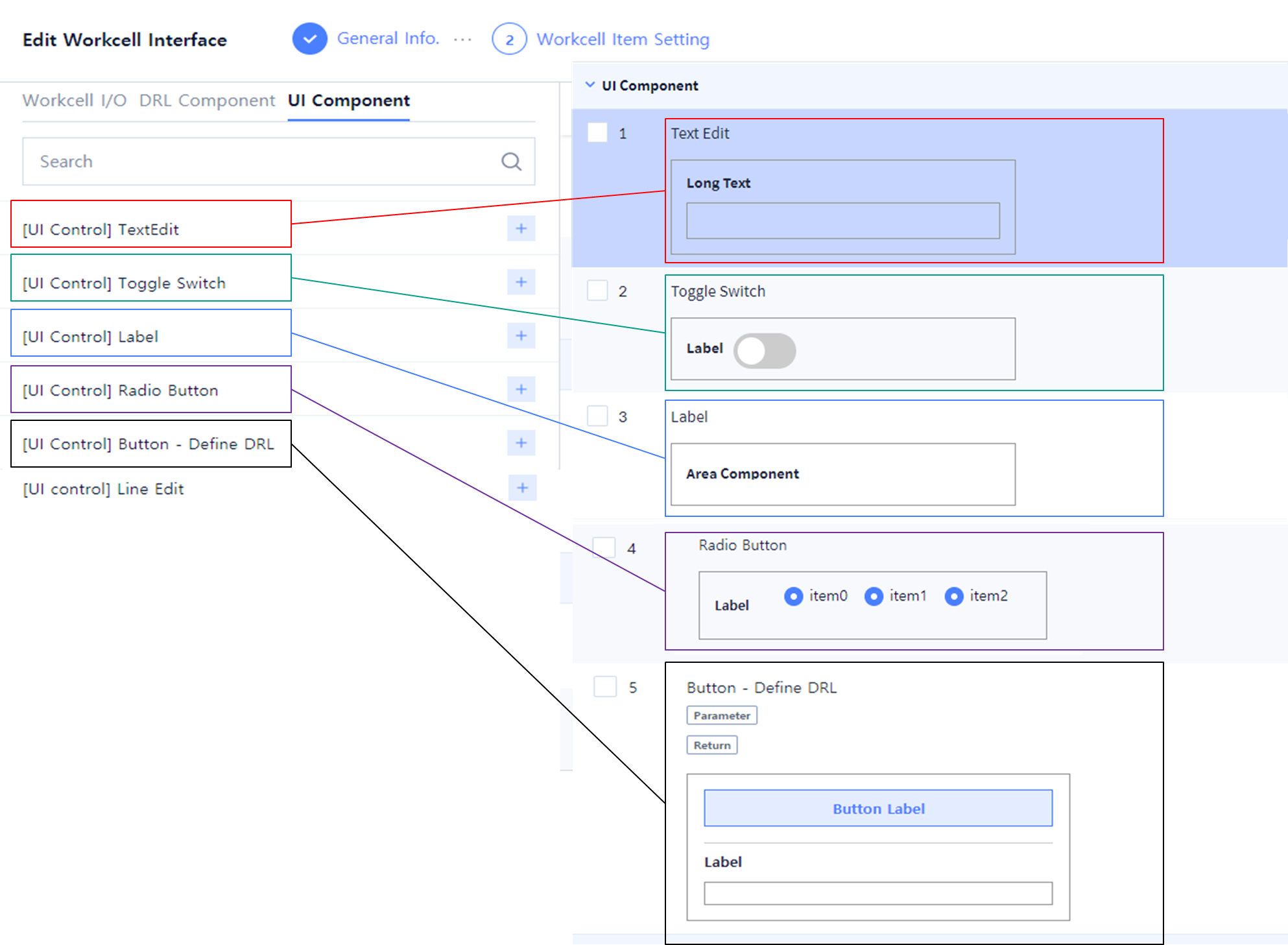
다음과 같은 UI Components들을 사용자 입력으로 사용할 수 있습니다.
-
Label
-
Text Edit
-
Toggle Switch
-
Radio Button
-
Button – Define DRL
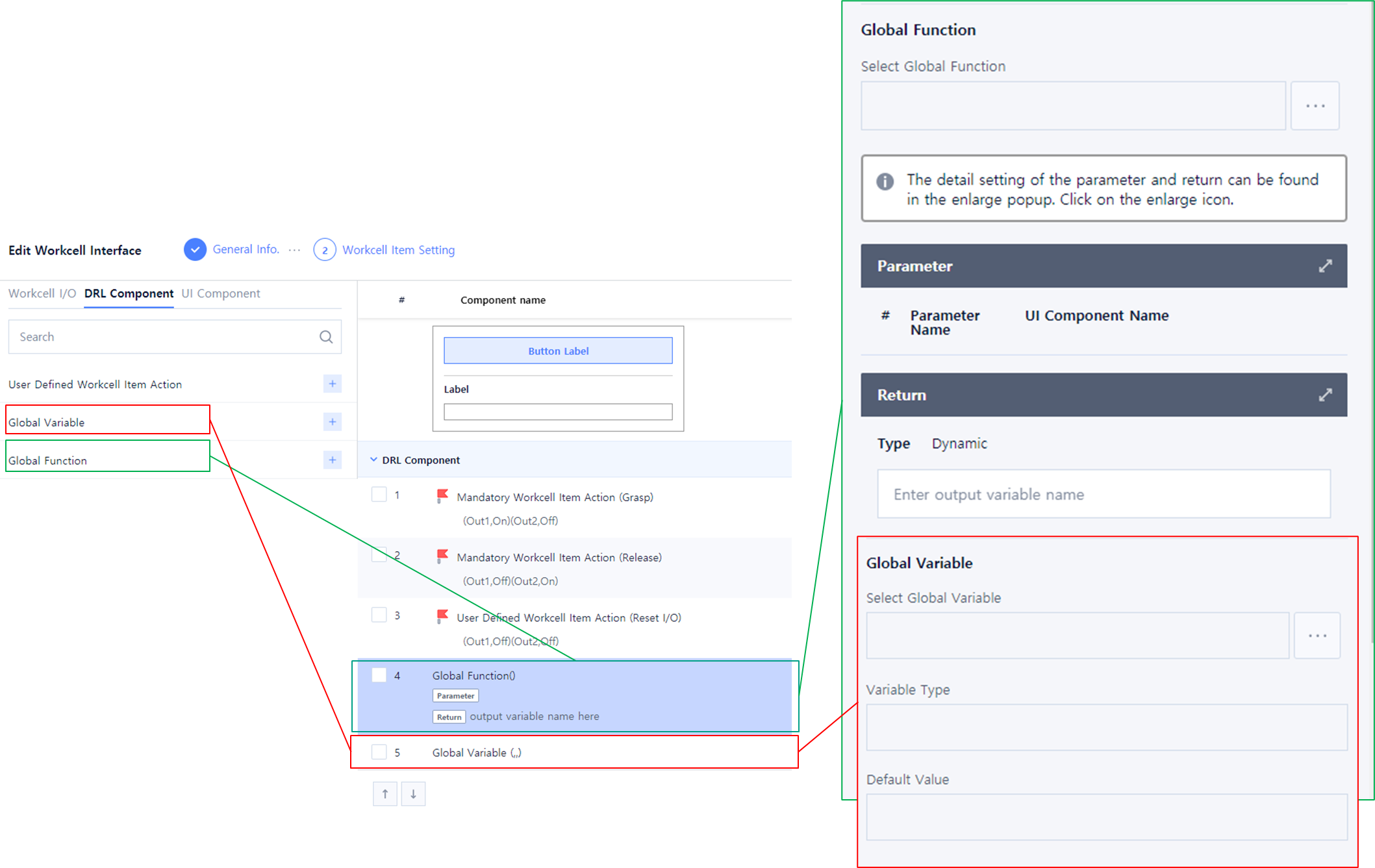
다음과 같은 DRL Components들을 사용할 수 있습니다.
-
Global Variable
-
Global Function
WCI 작성 및 수정 (Workcell Item Setting)
-
WCI 저장 → Confirm
-
다음과 같이 WCI list를 확인할 수 있습니다.