
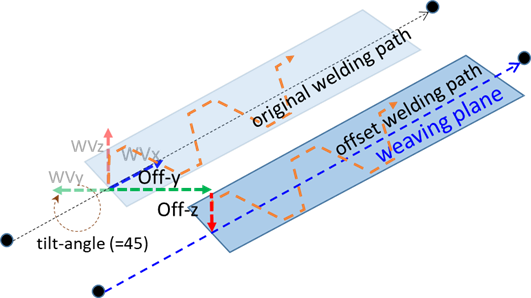
This sets the weaving offset and tilt-angle, which are applied universally on weaving patterns. Setting a weaving offset allows for an offset to be set on the welding path in the Y-axis and Z-axis directions of the weaving coordinates, and the tilt-angle creates the weaving plane by rotating the weaving X-Y plane centering on the weaving x-axis, as described in paragraph 3.5.1 Weaving Coordinates. Once the welding motion starts, the set weaving motion and path offset are applied, and the path offset can be adjusted from the real-time welding condition adjustment popup on the TP. The actual welding path is the set welding path shifted towards the Y-axis and Z-axis directions of the weaving coordinates by the Y offset and Z offset values.
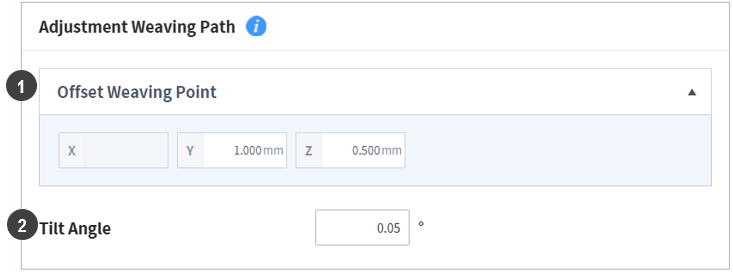
Values entered in the Weaving Condition Settings screen are as follows:
|
No. |
Item |
Description |
|---|---|---|
|
1 |
Offset Weaving Point |
This is the value for shifting the center of the weaving plane based on the weaving coordinates. Offsets are allowed in both the Y and Z directions of the weaving coordinates. (Unit: mm) |
|
2 |
Tilt Angle |
This rotates the weaving X-Y plane, where the weaving motion is executed, centering on the weaving X-axis. |
If multi-layer welding is performed, use the weaving offset to set a different offset for the same teaching path and save it as a different name for easier implementation.