
To use a robot from a different series, data back up and initialization must be executed according to the on-screen instructions. Controller software versions higher than V2.7 support all robot series (M, H, and A series). However, a single controller cannot be used with an M, H and A series robot combination.
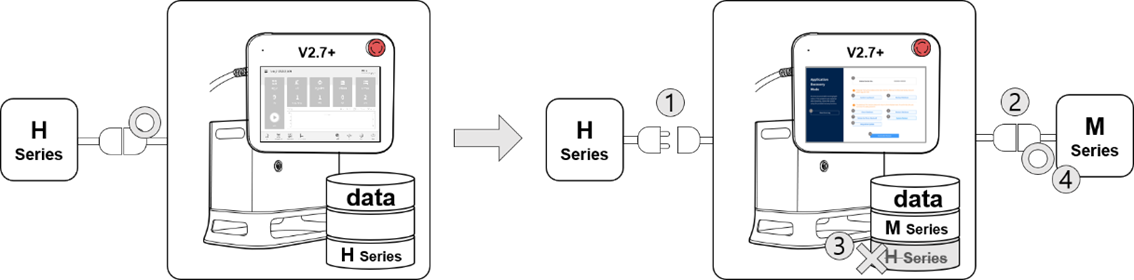
For example, if a controller with a software version higher than V2.7 is being used with an H series robot, disconnecting the existing robot and connecting an M series robot will cause a compatibility error screen to be displayed. Follow the on-screen instructions to execute data backup and initialization of H series, then turn the controller power off and on to allow an M series robot to be connected. Compatibility of each software version is as follows:
Series Compatibility of each Software Version
|
Software Version |
Description |
Series Swap Support |
|---|---|---|
|
M2.x.x.x |
M Series-only Software |
Not compatible. |
|
A2.5.x |
A Series-only Software |
Not compatible. |
|
V2.6.2 |
H Series-only Software |
Not compatible |
|
V2.6.3 |
Integrated Software (H/M Series) (Cannot be installed on A Series) |
Can be swapped between H and M series |
|
V2.7+ |
Integrated Software (A/H/M Series) |
Can be swapped between H and M series |
Note
-
A/M/H series have different connector structures for robot and controller connection, so the robot series cannot be swapped with each other.
-
The compatibility error screen is not displayed if a different robot of the same series is connected.
Caution
-
Take caution after swapping to a different model of the same series, as Safety Parameters, TCP, Tool Weight and various user defined settings are maintained.
-
Robot series compatibility may vary depending on the software version.
-
For a detailed change history of each software version, refer to the Release Note at RobotLAB (https://robotlab.doosanrobotics.com).