
Restores the robot system to a specific version the user chooses.
-
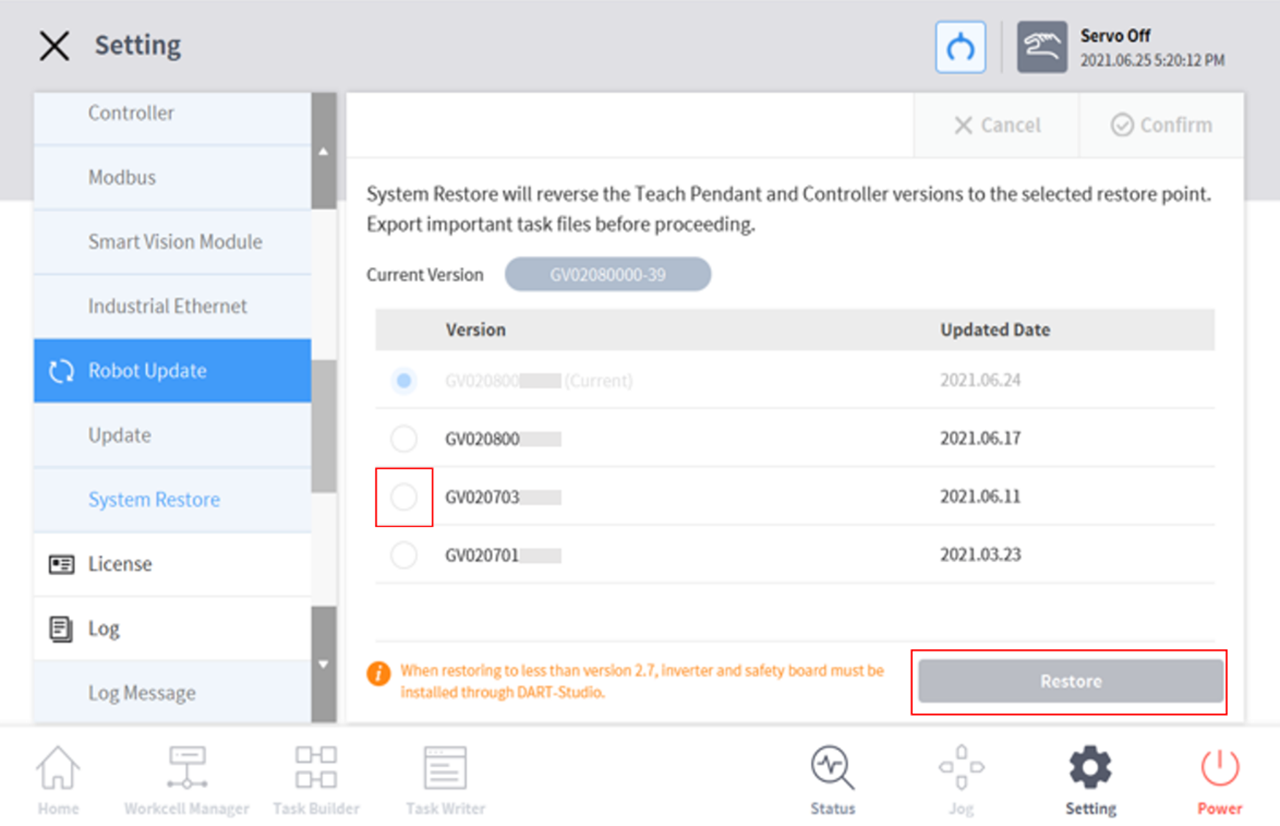
Select Robot Update > System Restore in the Setting menu.
-
The last five versions installed on the robot system are displayed.
-
The current version is displayed with the Radio button selected.
-
-
Select the Radio button of the version to be restored.
-
The Restore button is enabled.
-
-
Press the Restore button.
-
Restart the system when restore is complete.
Note
If the system is accessed via Windows, the system restore function is not available.
Version : A Series
If one of the following issues occurs on an A Series product after System Restore, please refer to Friction Calibration to perform friction calibration.
-
If an issue makes direct teaching control difficult
-
If direct teaching does not operate properly even the tool weight and weight center point settings are correct
-
If the robot moves too fast or applies too much force when direct teaching is attempted
-
If control in a specific direction is difficult when direct teaching is attempted
-
If collision detection occurs frequently while the collision sensitivity is set to the default setting
-
-
If error “2.9015” occurs sporadically in the teach pendant
-
Error 2.9015: The external force of the robot tip has exceeded the safe range.
-