Users need to plan the screen configuration and the sequence of the robot’s action before preparing the skill.
-
Plan the user input screen and select the UI Component
-
Action Sequence Planning
Plan the user input screen and select the UI Component
It is an example of planning the user input screen and selecting the UI component of ‘Sample_Pick’ skill.
|
Category |
Name |
Function |
UI Component |
|---|---|---|---|
|
Basic Setting |
Reference Pose |
Reference Pose |
|
|
Gripper Setting |
Gripper Release (Option) |
Gripper Action Option |
|
|
Gripper Wait Time |
Gripper Wait Time |
|
|
|
Set TCP (Option) |
TCP option |
|
|
|
Approach/Retract Pose Setting (Option) |
Approach/Retract Distance |
Enter the distance from the reference pose |
|
|
Velocity for Approach/Retract Pose |
Enter the velocity to the point away from the reference pose |
|
|
|
Acceleration for Approach/Retract Pose |
Enter the acceleration to the point away from the reference pose |
|






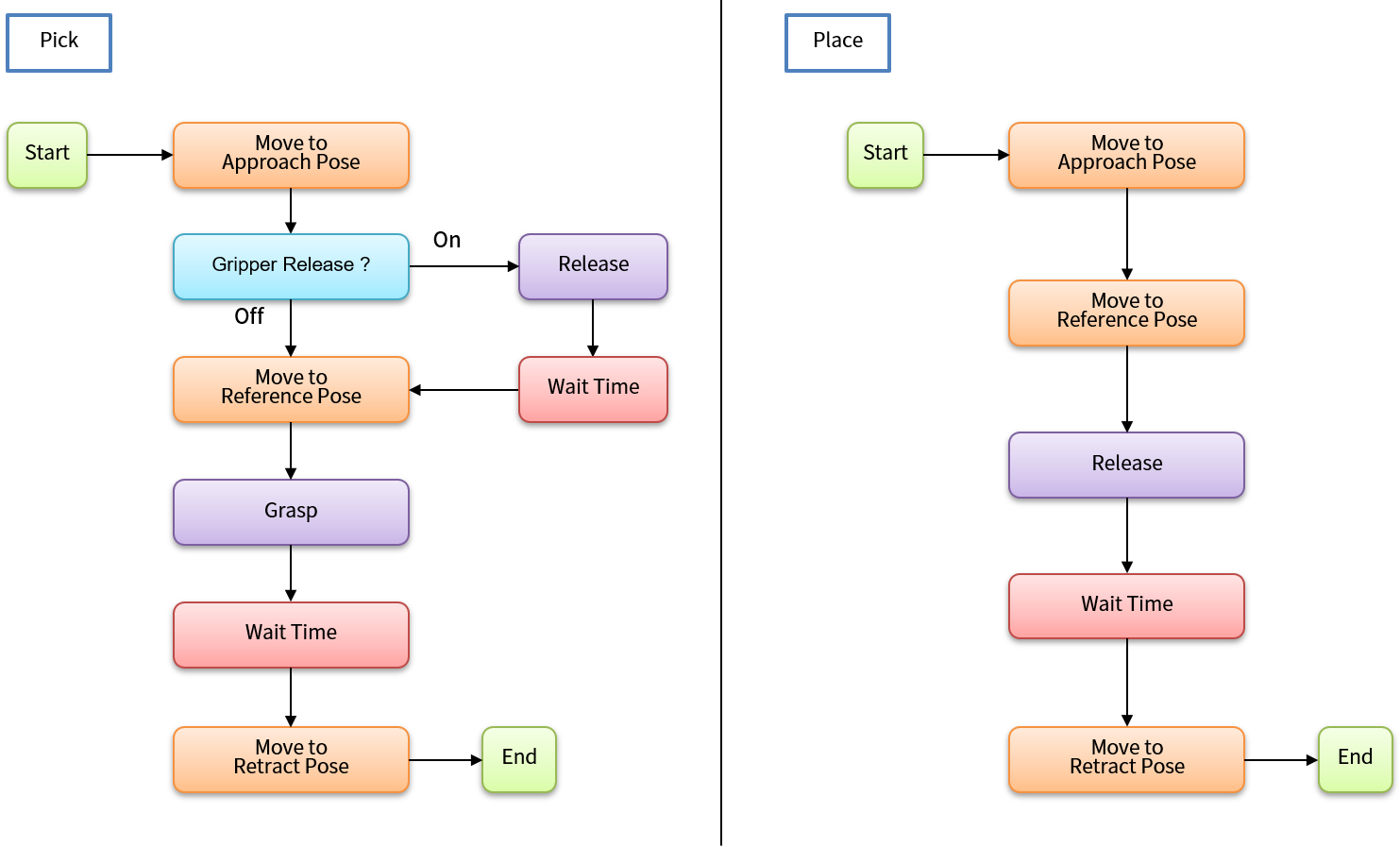
Action Sequence Planning
The following is an example of preparing a flow chart on the action of the ‘Sample_Pick’ and ‘Sample_Place’ Skills.